Mac user reports on NAS & Wireless connected NAS
Reports/Info last Updated: Feb 11, 2013 (Drobo FS and 5N)
(Added FYI on NDAS driver Status on 3/20/2012)
This page is a catch-all for reader reports on Mac NAS (Network Attached Storage), some including notes
on Wireless connected NAS after a reader request for Mac user feedback. (FYI: the Mac 802.11n page here also has some reports/tests on using USB Hard drives with the Airport Extreme 802.11n base's USB port.)
Reader Feedback: (later reports first)
If you've used a NAS on your Mac Network (wireless connected or not), let me know the details. (send report to news at this site, with NAS model/product link, if it supports AFP, network details, Macs/OS used, etc.) Thanks.
Benchmarking: Rather than xbench, please use "Helios LANtest" - available at Helios' Free Utilities download page. (Helios also has a "File System Test utility" for testing file server compatibility.)
BTW: If you're running "Jumbo Frames" on your ethernet network, include a note and if you've compared performance with and w/o it. (All devices on net must support JF.)
NOTE: I've tried to include links to the specific NAS mfr's product page (searching for them) in reports below but please include links if you have them (as well as other requested info in email link note above). Thanks.
Drobo FS (follow-up after 2 years use, recent problems) and Drobo 5N: (Drobo product page links)
(Added 2/11/2013)
NAS Report Update: Drobo FS and 5N
A year and a half or so ago I provided some comments on the Drobo FS as a Network Attached Storage solution. After two years and two weeks of continuous service I encountered a serious problem, and this is an account of what happened. I regard it as mostly a good-news story, but others may not see it that way. I also add some info about the newer 5N version.
My Drobo FS unit went into service in late December 2010. The first clue that something might be wrong actually came in early December 2012: files and folders that had a forward slash (/) in their names had their names changed, but were otherwise OK. On doing some internet reading, I came to the conclusion that this was perhaps a feature not a bug, as one really should not use forward slashes in file names even with Mac systems. Some Mac applications will not save files with names including the forward slash character. Still, everything seemed to be working as usual otherwise.
In mid-January 2013 I started noticing a slow-down in data transfers. I measured one transfer at a mere 4 MB/sec - lower than the usual slowest transfer speed. And it got worse. The last thing I was able to do was to delete a single file, and that took about ten minutes! A look at the Drobo log showed errors, but no more frequently than when the errors started in early December! Then the Drobo seemed to drop off the network. Drobo Dashboard could no longer see it, nor could the Mac Finder. A network pinger could still see it, however. Then the Drobo entered into a continual re-start mode. I shut it down: it took a while to respond to the manual shut-down switch, but it did. I presumed that the unit had developed a failure of the network interface - and possibly other things -and might need repair, but that the data was probably still good. The unit was still showing 5 green lights.
I was not concerned that I might have lost irreplaceable data; I had other back-ups including an off-site copy of most of it. The main potential loss was that the Drobo held one share with duplicates of media files for iTunes streaming. It was not that the data would be hard to replace, but rather that I had no record of what was there and how it was organized.
After reading in Data Robotics' Knowledge Base, I figured a new Drobo FS was in order: transfer the disks, use the new Drobo as before, get the old one repaired and then use it to back up the new one completely.
I transferred the disks to the new machine. It did show up in Drobo Dashboard, but immediately went into "protection mode" where it was ensuring duplication of the data. At one stage it told me it needed more space in order to complete the job, advising me to replace one of the smaller disks with a larger one. I replaced a 1 TB disk with a 2 TB disk and it seemed to be happy. After about 24 hrs of churning away it again showed 5 green lights, but also announced a "mount failure". In the Data Robotics Knowledge Base I learned that this generally indicates that the UNIX system software on the unit is corrupt. If I updated the firmware and Dashboard software, I would have access to a "Repair Drobo" command which might sort this out. It might take 48 hours, though, and might have to be done twice.
I proceeded with the updates and repair. After about 16 hours it reported a disk failure, but seemed to be otherwise happy to continue. I phoned Data Robotics to find out if I should replace the failed disk at this stage. The answer was "No, remove the bad disk, but don't put in a new one until the repair is complete." About 20 hours later, the repair was pronounced completed and successful, and a re-start of the FS proved that it was! No second "repair" required! The removed disk really was "dead" - it did not respond at all in a USB drive dock.
I now had access to all the files on the original Drobo! I tested about 100 of the files and all were good. A minor issue was that what had been separate "shares" were now simply folders inside a "lost + found" folder on one share. Inside the folders representing each of the former shares, the files were all there. In Icon View, the icons seemed to be in all the right places even! The first thing I did was to print out a copy of file directory of the "share" that was not backed up. The second thing was to back up that share to a hard drive. In creating this back-up there was an issue where one folder would not copy "(file not found" error message), although all the files within it could all be copied to a newly created folder of the same name! Strange, but I've seen that happen working just with multiple drives on a single Mac.
A surprise: the file names that had been changed because they had forward slashes, now had their original names with forward slashes again!
I was also able to regain use of the first Drobo FS by doing a "Re-set to Factory Defaults" - which also erases all data on any resident disks. This was no problem; I had placed older, lower-capacity disks in this unit for the experiment. No hardware repair required - apparently! The unit is still working fine after over a week of continuous use.
The lessons of the experience:
A single Drobo (or any disk array) is not a secure file storage solution. There are indeed other possible issues besides drive failures. I'm not sure that I would even trust two units as a complete back-up solution. One really needs at least an additional off-site back-up of some sort.
Recovery from file corruption is possible, if time consuming.
Disk arrays are probably harder on disks than using single disks. Expect drive failures.
Leave enough unused space on the unit so that even with a failed disk, the unit can recover.
I still regard the Drobo FS as a very convenient, easily expandable, network storage solution for every-day purposes. I also still find the Drobo Dashboard software to be somewhat flaky. For example, I frequently find that Dashboard on one computer cannot communicate with the Drobo, even though Dashboard on another computer can, and the Mac Finder seems to have no problem. The Drobo usually shows up in a Finder window sidebar just fine, even when Drobo Dashboard can't see it. I will continue to use Dashboard only when I need to.
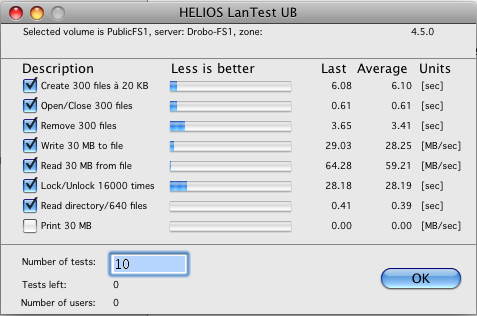
Whether it's the new firmware or different disks (now two 1TB Caviar Black plus two 2TB Barracuda LP), I don't know, but the unit seems to have speeded up. Test report enclosed.
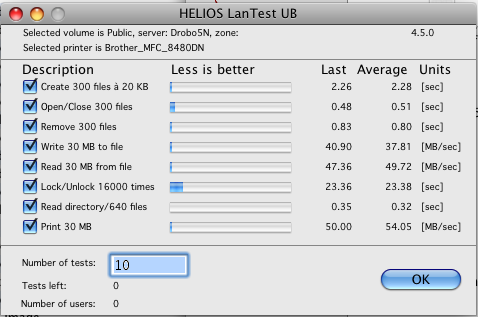
More recently I have also had the opportunity to try out the Drobo 5N which is an update/replacement for the FS. It includes a 6th slot for an mSATA SSD. It is advertised as being significantly faster than the FS. My brief experience is that it is faster - especially writes - and the speeds seem to be more consistently at the higher end of the range. The Helios LanTest shows the read speeds to be lower than for the FS with new firmware, but my experience is that they are essentially similar, except that I have not seen anything slower than about 11 MB/Sec (compared with 5 for the FS). This is for folders containing thousands of small HTML files. On the down-side, the 5N requires at least OS X 10.7 to run the required version of Drobo Dashboard. Earlier versions of Dashboard can see the 5N but some of the data reported is erroneous (like the number of disks it contains!). I do not actually have a Mac running OS X 10.7 or 10.8, so I used the Windows 7 version via BootCamp. I noticed that the wake from sleep behavior I reported earlier has not changed, even for the Windows version: 30 seconds after waking from sleep Dashboard dismounts any Drobo "shares" and re-mounts them about 30 seconds after that. The 5N also does not support the Drobo Apps ("at this time" according to their web site).
Thanks for the great service and support to Mac users!
-Harold"
Thank you Harold.
Synology DS1512+ Report (High-Perf. NAS Server w/5 bays, Up to 3GB RAM Module):
(Added 1/21/2013, updated 8PM ET w/more info)
"Mac NAS report (Issues with Synology DS1512+)
After many years of dealing with data scattered over many different computers I finally decided to throw in the towel and centralize my storage with a NAS. I considered building my own, but then decided that having a small, energy efficient and easy to operate unit was more important to me. After many months of research and investigating I finally picked-up a Synology DS1512+. The unit itself is extremely well built and I really like the web based interface - it is well laid out and easy to operate.
I was simply delighted with the unit until I started transferring my data onto it. I quickly discovered that when using AFP (or even Samba as a "workaround" suggested by Synology), all files transferred onto the NAS get the execute permission bit set, irrespective of the file's original permissions. This behavior is normally masked in the Finder since all files with known extensions will open in the correct applications. However, any files that are not associated with specific applications will attempt to execute in the shell when double-clicked.
I work with many files at the Unix shell level and this issue makes the NAS virtually useless to me at the moment. I also have a problem, in principle, with moving all my data onto the unit, knowing that it will all come back with different permission bits. I have explained this in more detail in the Synology forum (forum.synology.com/enu/viewtopic.php?f=64&t=61913 - File permissions are completely broken under AFP). Synology confirmed that this is a "known issue" but they were not able to tell me when it will be fixed. Based on some posts in their forums this has been going on since at least the middle of 2012. I cannot believe that none of the raving reviews of the Synology NAS units mentioned this bug, even those describing Synology as being the "most Mac friendly".
The Synology is running the latest DSM version 4.1-2668. The erroneous behaviour occurs with OSX versions 10.4, 10.5, 10.6 and 10.8.
I wanted to share this with you in case the information may be helpful to others.
Thank you and all the best!
-Peter
(I have been a follower of your site for about ten years and I have always found it to be an indispensable resource. Many thanks for all your efforts)"
Thanks Peter. (Some tough times the last few years but still hanging in there.)
Synology DS212+ ("High-Performance 2-bay All-in-1 NAS Server"):
(Added 3/21/2012)
"Over the past 3 years, I've been using 5 ReadyNas Duo v1 (Sparc chip) as AFP file server + backup, they worked quite well, until LION + ReadyNas Firmware Raidiator 4.1.8, transfer speed have degraded too much over AFP. Trying latest beta 4.1.9T2 , I fried one unit, it corrupted the onboad NAND memory without any chance of recovery. So it was time to test new product. Did some search online which ended with a choice between QNAP and Synology.
I purchased Synology DS212+, good interface, fast processing, AFP works very well, good device for Mac users. The media center streams well to my Samsung (DLNA) as was the ReadyNAS before. Price is about $440 in Australia which is 35% Cheaper than a better looking product from QNAP.
Internet site is well designed and they have good demo online. Very flexible setting, UPS (MGE Pulsar Evolution 1100) is fully compatible. Highly recommended for Mac user.
I have 4 iMac i7 running Lion 10.7.3, and 1 Powerbook (ppc G4 1.67Ghz) running OS X 10.4.11, all in the same Lan through a Netgear 16 port switch and a Cisco Gateway acting as the router. The disk station is used as a file server and 5 users are working directly from it.
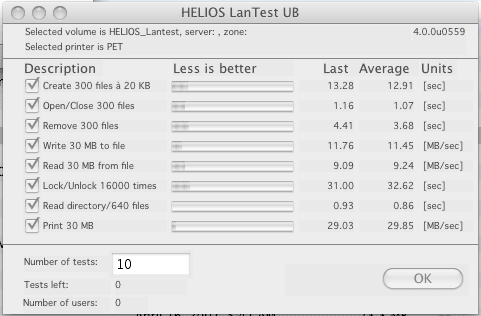
See attached Lan test result, write/read speeds average:
- Fastest iMac (i7): 45.91/64.51MB/sec
- Slowest Powerbook G4: 42.05/33.08MB/sec
(screenshots of Lantest results)
iMac i7/3.4GHz/OS X 10.7.3 - Synology DS212+

PowerBook G4/OS X 10.4.11 - Synology DS212+

I re-used the old drive I had in the Duo as they were 1TB Seagate Enterprise models and were compatible.
I will be upgrading all other sites to the DS212+ also in the next few months speeds are x2.5 more than what we had with the ReadyNas Duo.
Kind regards,
Jean-Luc W."
(Ximeta) NDAS Mac OS Drivers Status: (added 3/20/2012)
I've had a couple mails asking about Updated/Lion compatible drivers for an OWC/Newer Tech NAS. Although no specific model# was mentioned, I assumed they were NDAS. (That chipset and driver were by Ximeta I think and EOL now.) I wasn't sure they ever did any later drivers but wrote Larry at OWC to ask if he knew the status of any new drivers (from Ximeta) for the NDAS drives. Here's his reply:
This is the current (Mac) status:
www.ximeta.com/web/webTemp/html/supports/supports_download.php
(mac post dated 8/24/2011)
"MAC OSX Lion and 10.6.7, 10.6.8 Release
NDAS for Snow Leopard 10.6.7 & 8 and for MAC Lion has become unstable.
Development has been notified and IOCELL Networks is in the process of reviewing the required updates."
(Below that they also note)
"If you would like to be notified of developments and release of the next NDAS for MAC,
please send an email to support.
To join the development team, please use the contact form."
(active email/form links are on the ximeta page)
As of 3/20/2012, that page's latest (not new) Mac downloads are NDAS software v1.8.4 for OS X Snow Leopard 32bit ("until version 10.6.6") and OSX 10.3 - 10.5. (Farther down there are older/previous versions.)
Synology DS211J
(Added 12/12/2011)
"Just a quick report on a Synology DS211j.
Connected via Ethernet to an Airport Extreme (5th gen) base, Ethernet to the Synology.
Wireless write/read speeds are about 12-14MB/sec

-Arthur"
Netgear Stora 1TB
(Added 11/25/2011)
"Netgear Stora 1TB (with the latest firmware (hbs-5402 ) and desktop applications (1.4.4.103))
Summary:
Not the best NAS on the market but at its a price point (£128) with a 1TB hardisk its hard to fault especially with a second bay for exemption and very basic RAID 0 and 1. Over the past week it has delivered a stable solution but in need of some tweaks out the box for mac users to get it working well with OSX.

AFP and TimeMachine Support:
It supports AFP but not the standard that Lion demands it also claims to support time machine but this also has issues without altering MAC OSX via the terminal. (See www.silly-science.co.uk/2010/07/17/netgear-stora-and-time-machine-setup/ )
Due to the backup software not being compatible either you don't have an automatic backup solution out the box (maybe consider Smart Backup or edit your system in the terminal). You can access the files via SMB out the box and the web interface works providing you don't want to alter the top level folder structure, I renames some files and now I'm going to have to spend several hours copying all the files off the drive and starting over.
Apple TV and Streaming Video:
If you have a jailbroken AppleTV (firecore) you can stream video and music from the NAS direct from an iTunes folder however this is at a file level. This mean that you can browse to a artist folder or file rather than a playlist or using any of the metadata stored via iTunes. Possible to stream DVD quality (videoTS) video to devices via apple airport extreme (8011.n) but this leaves only a small amount of bandwidth and in my case if more than one devise is accessing the NAS to stream video it cause buffering to occur fine with more efficient codecs.
Benchmarking:
HELIOS LanTest results over wireless network. (Tests are via AFP.)

Backing up via USB:
To backup the NAS you can plug in an external USB drive however this feature requires a premium subscription if you want to copy files automatically.
Sharing and accessing files via the web:
An online service neatly handles dynamic ip addresses and maps your drive via a website and uses a reasonably well designed webpage that previews files and allows people who have been sent unique links to access specific folder or photo albums. Other users (limited without premium subscriptions) can access their secured areas using a log-in.
-Steve M. (UK)"
Thanks Steve. (Here's an older (not mac) web page review of the Stora with some user ratings.)
QNAP TS-419P+
(Added 4/14/2011)
"I use a QNAP TS-419P+ here at work. (Here's mfr product page) It's a 4 bay enclosure. We have four 2TB drives in its and we set it as a RAID 5. (It can do every raid option under the sun) It has dual GigE network ports and supports all kinds of "Shotgun" network options.
Actually it's setup Web interface has every option you can think of and it's presented in a clean, easy to understand interface. It also has a front panel display that allows you to see errors, or do basic setup from the box itself. It's worked flawlessly for 5 months now.
I strongly recommend it.
(He later wrote)
I have tried jumbo frames. But the switches here at work don't support it so I can't really get a sense for how well it works. As soon as I turn on the option from the web GUI it drops off the network and I have to direct connect it to a Mac to access it again.
I set it up to use iSCSI for awhile (built in option) and 4 of us could capture SD video to it with no issues. I used the globalSAN iSCSI initiator software that's free online. Now I just use it as a large backup storage device in RAID 5. The box is great, but my old drives keep failing. Need to buy new WD RE-4's. I use it with four 2TB original WD RE-4's at the moment and they are starting to wear out. I'm not sure if it works with 3TB drives.
-Kevin"
Synology DS-410j
(Added 4/14/2011)
"(I previously reported on FreeNas which was posted on 6/7/2010 (down this page) Since then I have gone ahead and switched to an appliance. Here is what I posted on the SmallNetBuilder.com forum back on November 10, 2010)
I have always been a fan of building my own NAS. I have dabbled with various Mini-ITX motherboards and *nix distros over the years. Up until a couple weeks ago I had been running freenas based C2D based NAS with 4x500 and 2x1TB drives. This NAS was good for ~70Mb/s peek throughput performance.
My push towards an appliance was due to a recent electricity bill. Due to a new tax and an increase in electicity rates, I received a bill that was 20% over my highest previous bill. I immediately decided to invest in lower power equipment.
I was contemplating a Qnap TS-419P or a Synology DS-410j. I was leaning towards the Qnap but then newegg.ca dropped the pricing on the ds410j dramatically for the diskless version so that's what I went with. With this appliance I was going to use 4 WD Caviar greens that I already owned (WD10EADS).
The NAS came in and I built it up the same day it arrived. I staged it in my office on my desk. Build quality of this device is excellent. The second thing I noticed once I powered it up was that even though this device has four 1 TB drives in it; it was oscillating less than my LaCie Quadra 1 TB external hard drive. This was my first clue that this is a first class device.
Let's get to the nitty gritty, performance, 250Mbits (27-31 MB/s) of throughput is what you'll get from this NAS. What I find most amazing about the performance is how consistent it is across all protocols. Samba, AFP, nfs, the performance is almost identical. As far as I am concerned this is acceptable performance. (Sure faster is awesome but you must pay for performance)
The DSM. I am most impressed. This is probably the best management interface I have come across for any appliance and I have played with, and I have played with many (especially professionally). What you get with the DSM far exceeds what you should expect from a $330 appliance.
I have also played with the surveillance station & the download station. Both work exactly as advertised and my wife loves the fact that she can peek in at our son when he's playing in the basement from her iPhone anywhere in the house. The only con I have for the surveillance station is it costs $50 for every camera you want to add after the first. I understand this is likely cheap for a business but it's rather pricy for a consumer application.
Overall I am very pleased with the Synology DS-410j. It is a very capable NAS server that provides a feature set that far exceeds its price tag.
I wouldn't hesitate to recommend this server to anyone looking for a home NAS.
This remains absolutely true to this day. I can also add that this appliance runs 24/7 without issues. It is very reliable.
"-Donald B.
Drobo FS Report: (See above for later comments from Feb 2013)
(Added 4/12/2011)
"Hi Mike, I purchased a Data Robotics Drobo FS four months ago to resolve my storage requirements that seem to be be growing slightly faster than Moore's law. I am generally pleased with it, but I also have a warning for potential owners/users.
The 5-disk unit itself seems to be quite solid. The supplied "Drobo Dashboard" software needed to administer it, however, can be dangerous to your data if used during a data transfer. I'll explain later.
My unit is currently configured with two 1 TB WD Caviar Black drives, two 640 GB WD Green drives, and a one Seagate Barracuda 750 GB drive, in single-redundancy mode. I have attached the HELIOS LanTest results (note that for some reason the read and write tests seemed to default to 30 MB file size rather than the 300 MB other reports show). These results were obtained using a Mac Mini (2 GHz C2D) over gigabit ethernet.
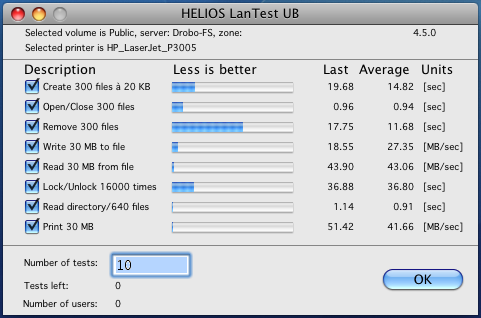
The reported read tests look about right. The reported write test, however, is at the upper limit of my experience. I have found write speeds to be surprisingly variable, from a low of about 5 MB/sec to a high of about 28 MB/sec. Write speeds are generally not an issue for me - except when I was originally filling the unit with 22 years worth of image files. One surprise for me: the Mac Mini has never been able to play back full resolution HD video files made with my Canon 7D. With the files on the internal 7200 rpm drive or on an external FW 800 7200 rpm drive I have had to play these files back at half-size in order for them to play acceptably. The same files on the Drobo play back fine at full size! The Drobo also does well in database search operations where it permits searches in about one-third the time required when the same database is on an internal 1 TB SATA-I connected drive (Dual-processor 1.25 GHz MDD Mac used in this test).
I have not used the Drobo FS much with Windows machines. But near as I can tell, without any additional set-up the unit appears to Macs as an AFP server and to Windows machines as an SMB server. We have 8 computers on the network - three of them running OS-9 - and all work well with the Drobo, including when connected wirelessly via an AirPort Extreme.
The unit is reasonably quiet (quieter than my firewire drive on the Mini) and generally runs cold to the touch.
The only real negative so far concerns the Drobo Dashboard software. This utility is needed for initial set-up and any subsequent changes to the set-up. It is also necessary to determine accurately how much free space one has left. (The lights on the unit will indicate approximate space usage in 10% increments.)
The Drobo Dashboard utility can also be used to mount and dismount shares, but I would advise strongly against this.
I found read and write rates to be slower when Dashboard was used to mount shares than when the Finder is used. But that is not the main issue. The real problem is that Dashboard seems to have its own ideas about when to mount and dismount shares. I found that generally after a wake-from-sleep, Dashboard would dismount any shares that it had mounted about 30 seconds after awakening from sleep and then remount them perhaps 30 seconds later again. The share was useable before it was dismounted, so any transfer that had begun will get interrupted - with possible loss of data. This dismount/remount may also happen when one "logs in" to Dashboard as required to make any configuration changes. In one case a log-in resulted in one share being dismounted and different one being mounted - during a data transfer! On two occasions Dashboard has also dismounted my firewire drive in the process! I did talk to their technical support folks about this. I was instructed to de-install Drobo Dashboard and then re-install a later version. This seemed to work for about a day, but then the old behaviour returned. There have been later updates to the unit firmware and the Dashboard software, but I have sworn off any further experimentation. I have had no such problems when the Finder is used to mount and dismount shares.
Data Robotics also advertises that various applications are available for media serving and such. These are open-software UNIX applications with varying degrees of documentation and ease of use. I use one of them for serving still images. It works OK but is not very Mac-like to set-up and use. It does however serve photos to an iPad (using MLPlayer) and also worked with a Sony Blu-ray player until I "updated" the software on the Sony.
-Harold"
Reader blog on Coolmax CN-330 NAS: (1st post July 21, 2010, Updated Feb 8th, 2012)
A reader sent a note after seeing an earlier report here on it, he bought one and posted a page w/notes and pix of the Coolmax CN-330 NAS. (Updated Feb 8th, 2012 - below)
(Feb 8th, 2012 Follow-Up)
"About my CoolMax CN-330 NAS...
I thought you might want to update my info on your webpage...
I've had to basically flush the CN-330 down the drain.
mtiernan.blogspot.com/2012/01/cheap-nas-at-home-saga.html
I'm now looking for a new one to try and build up for my home.
Talk to you again!
-Michael T."
LaCie Network Space 2
(Added 6/11/2010)
I'm French, excuse me, my English is very poor. I purchased a network Storage, LaCie Network Space 2, updated with the latest firmware 1.2.5. Compatible with Time Machine. Connected between three Macs and a Netgear GS105.
Attached are three screenshots of the (Helios Lantest benchmark) tests:
-Laurent A."


ReadyNAS NVX Pioneer (RNDX400E)
(Added 6/7/2010, updated 6/8 w/LANtest benchmark results)
"I purchased a ReadyNAS NVX Pioneer (no disks come with Pioneer edition) in late May 2010, put 4x2TB Seagate Constellation ST32000644NS drives in it and attached a 2TB WD Caviar Green in a OWC enclosure by USB -- have had this configuration up and running for about a week . With Firmware 4.2.9 things have been working very well (after trying 4.2.11 I had some issues, so I downgraded back to 4.2.9 - check out notes on ReadyNAS forums). I've configured it to use NetGear's X-RAID2 raid system, giving me just over 5.5TB usable space. On performance, I consistently get straight file transfer speeds of at least 35 MB/sec, usually between 40-50, and sometimes higher, over gigabit ethernet. A large file transfers with a higher rate than bunches of smaller files, as you'd expect.
Helios Lantest Benchmark Results

Configuration is easy. The RAIDar utility included reliably finds the NVX on my network and from there it's one click to run the browser-based admin application (which you can also get to with an ip address from Safari). RAIDar keeps you informed of what the NVX is doing during booting, file system checking, etc. so you don't have to guess when you'll be able to run the admin utility. The admin console provides options to configure parameters for Network, Security, Services, Volumes, Shares, Backup, Printers, System, and Status. The only thing I found glitchy was that after changing network parameters on the NIC's (there are two on the NVX) I had to reboot the NVX to reliably get my Mac Pro to connect to it again. But since setting network addresses will be a one-time thing, it might have been user error (it's set up the way I want it now, so I'm not going to make any more changes).
Each share you define on the NVX can be configured to use any combination of CIFS/SMB, AFP or HTTP/S. I've noticed that the SMB connections are periodically unreliable, but I believe I've read about some known issues with OS X 10.6.3 and SMB shares on MacFixIt, so it would seem to be a known issue since I use extended attributes (like labels) on files very often. AFP connections have been rock solid, however, and since I'm using primarily macs, AFP is my preferred connection method, anyway. Finder (and PathFinder) both show you Shared devices for the base NAS, one for AFP connections, and one for CIFS connections. (I still have CIFS enabled because I have a Windows PC that I'll want to access the NAS from time to time).
I have the array partitioned into 2 major volumes, one for Time Machine (~2TB, which is the maximum for my configuration) and the rest for a common share that I use between a Mac Pro, Macbook Pro, and Mac Mini. The NVX has managed to maintain simultaneous backups from all 3 macs over Time Machine as well as a multi-GB file transfer to the common share without any blips. There's no special tweaking needed to configure the NVX for Time Machine - it's a configuration option and you simply check a box in the admin console and you're all set. No creating sparse bundle disk images, etc.
The NVX has a backup scheduler, which I use to backup the Common share to the drive connected by USB daily. The drive I have connected is 2TB, but I've got about 3.5TB of common shared space on the NVX. No problem here, because as my first Common share approaches 2TB, I'll make a second Common share and attach another 2TB USB drive with the second USB port and set up a second backup job.
One of the things I really like about the NVX is it has a built-in SMTP server. I have it configured to send me emails about events (backup jobs, SMART disk status, RAID events, etc.). It's nice not having to log in to the console to check. There are many other features I haven't explored yet - including NVX-add-on applications you can download from their web site, and I haven't had tons of runtime, but so far, I'm extremely happy with the capability, performance, and ease-of-use of the NVX.
Mike G."
Netgear Ready NAS Duo
(Added 6/8/2010)
"Just thought I'd drop a quick note on the Netgear Ready NAS Duo that I've owned for over a year now. It's been fantastic. Peace of mind for all of my iTunes, DV, and digital images. Very reasonable if you're into such things.
Currently have 750GB mirrored pair. With the cost of 1TB+ drives, I'll likely upgrade in a few months just for more space.
Pros:
- Easy to set up
- Nice web-based interface
- Set up and forget (mostly)
- Great community support
Cons:
- Finicky on which drives it likes (check the website)
Regards, Mark G."
Netgear ReadyNAS NV
(Added 6/8/2010)
"Have two Netgear ReadyNAS NV units and have had excellent performance , feature upgrades and support. I don't use them for TimeMachine mostly because TimeMachine itself is too buggy. Use them as media network servers accessed by 2 mac mini's and a PS3.
-Esteban V."
Synology DS-209
(Added 6/8/2010)
"I've owned a Synology DS-209 RAID 1 NAS since December '09, and it's worked quite for with my Mac-based household. It ships with Mac setup software to initialize the RAID (it comes diskless), then provides a web-based interface for more detailed management. Among its most useful features are SMB and AFP shares, an iTunes "Home Sharing" style DAAP server, BitTorrent/NZB downloaders, shared folder access restrictions, RAID problem notification via email, an easy to open case, and a package management system for installing additional software.
It was a little more expensive than I hoped, but the depth of its software and array of configurable options made it well worth the price. Over a gigabit network, I can easily transfer files at ~40 MB/sec. I couldn't be happier with it.
-Collin A."
Synology DiskStation DS410
(Added 6/8/2010)
"I did have some recent 4 bay NAS experience to share. The key feature I was looking for was it's ability to be accessed via ethernet, which both of these NAS boxes do.
I've tried two 4-bay NAS boxes recently: the Intel Entry Storage System SS4200-E (approx. $329 new) and the Synology DiskStation DS410 (approx. $500 new). Both support ethernet and cannot be used as direct-attached storage.
The bottom line here is that the SS4200 is not worth the paper it's printed on; poor Mac support, slooowww, no mod community, and just basically painful to use from a Mac. It supports SMB and NTFS, but doesn't automount, you can't control it's startup/shutdown via scheduled events, and it doesn't support any of the interesting network protocols. It's also huge and heavy. The one thing the SS4200 has going for it is that you can install Windows Media Server on it, which seems to be what most people do with it.
In contrast, the DS410 is amazing. It automounts, supports time machine, is fast, and supports iTunes media streaming and uPnP media streaming. It has a rich GUI for controlling daily automatic startup/shutdown, and is a joy to use. There's a large mod community. I can't recommend it highly enough, despite it's pricetag. It supports quite a few other features like camera server, photo server, printer server and so on.
-Andrew"
Netgear ReadyNAS RND2000
(Added 6/8/2010)
"I have been using this NAS (Netgear ReadyNAS RND2000) for over a year without a single problem. Works great, easy to install and also has some nice power saving and backup features.
The price isn't too bad either. I don't thing they have gone up even a dollar over the last year. Very dependable. I share it between 2 macs and 2 media players in my home.
-Jim F."
QNAP439 Pro
(Added 6/7/2010)
"My 1st venture into Mac NAS was using the Drobo with the add on Ethernet adaptor. It was painful. Drobo tried to add to much intelligence and it worked very inconsistently. The NAS drives would often be inaccessible, and one would have to walk through very arcane steps to restore the access (often with extensive phone calls to support). Ultimately I gave up and bought a QNAP 439 Pro about a year ago. It is equipped with 4 2TB drives in a RAID 5 configuration. It proved a great decision. The drives are reliably accessible and it is as close to plug and play as I am comfortable with. I have had zero problems with it. I mostly use the drives as a media library for a Sonos full house system. It works very reliably.
(I like to include a product page link at the mfr's site. Is this your model?-Mike)
I purchased the TS-439, the Pro (and Pro II) and newer models with faster CPU's otherwise physically the same.
Cheers, Cam"
Dlink DNA323
(Added 6/7/2010)
"Been using the Dlink DNA323 for years now, without a lick of trouble. Make sure it has the latest firmware.
-Tracy"
FreeNas (some earlier reports also used this for a DIY NAS)
(Added 6/7/2010)
"I fall into the category of "roll your own NAS". I have been using freenas for 5+ years and it has proved very stable. There is support for SMB, NFS and AFP (including one volume for Time Machine) as well as http, ftp, torrents, media server, etc...
The hardware running freenas has morphed over the years. Currently I am using an MSI 965G based motherboard with a core 2 duo 1.86 CPU with 2 GB of memory as well as an Intel Pro 1000 Server NIC (onboard disabled)
I have two RAID volumes. 4x500 GB RAID 5 & 2 x 1TB WD Green RAID 1
I get consistent throughput of ~50MB/s read and write to the device using my Macbook 5,2.
One note for heterogeneous environments, performance is not as good from a Windows system with the NAS as the throughout seems to top out at about 15 MB/s using SMB. Better than 100BT but not stunning.
Overall I would recommend this setup for anyone as its fairly easy to setup and there are lots of tutorials online. Migrating hardware would require some *nix experience as one as to understand how the drive devices are setup and then edit the freenas xml config has to be updated manually with the new device names if one needs to remove/add devices to a RAID volume.
Overall I give it a thumbs up!
Donald B.
PS: I also have a 500GB time capsule which is used as an AP and a Time Machine target."
Synology 209+
(Added 6/7/2010)
"My Synology 209+ works stable and fast. Well featured, the first (?) to support time machine protocol, good AFP/SMB support.
The ajax based webinterface is good, there are 2 apps for iPhone (mp3 streams).
(Assuming this model?-Mike))
My model (product page) has been replaced with DS210+.
Same box, more encryption. It is a small-medium business NAS...
the box without the 'plus' as you found is a smaller box, not that advanced.
The 209+/210+ is not the cheapest box.... but I am very happy with it.
-D."
CoolMax CN-330 NAS
(Added 2/23/2010)
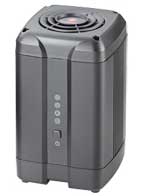 "I recently purchased an inexpensive CoolMax CN-330 NAS at Micro-Center and tried it out on my Mac and PC network.
The CoolMax houses 2 SATA hard drives and supports RAID 1 drive mirroring, as well as RAID 0 and drive-spanning. It claims to support NFS, FTP, iTunes music sharing and Samba (Windows file sharing).
(Oddly, some of the product information for the unit speaks about supporting bittorrent, and claims RAID 5 support - though nothing in its web interface made mention of torrents, nor do I see how it can do RAID 5 without housing at least 3 drives?!)
I set mine up with a matched pair of 500GB SATA drives I had lying around and configured it as a RAID 1 mirrored set. I found that by default, it formats its hard drives using the Linux ext3 filesystem, but offers several other formatting options (like NTFS and ext2) which I didn't try out. (Someone on Amazon complained that if they chose NTFS formatting, it crashed the web interface!) By default, it created an "admin" share which was only accessible by connecting to it with the username and password configured for administering the NAS, a "public" share, and a "guest" share.
One annoyance I discovered in short order was that the default TCP/IP configuration for the CN-330 was to run as a DHCP server, and to dynamically assign itself an IP address. Since my AT&T U-Verse residential gateway is already functioning as my DHCP server on my LAN, this caused issues. I was able to reconfigure it for a static IP and disable the DHCP server functionality, however, and get it working properly for me.
Another oddity I found with it? If I reconfigured the disk configuration (changing from RAID 1 to RAID 0, for example), it reset all of my settings back to the factory defaults upon saving the change (including forgetting the static IP I had set up for it)!
Once I had it working, I had no problem using it as a file server. The shares worked properly from both my Windows 7 PC and my Mac OS X machines. Then, I tested the iTunes music sharing functionality. (They said to create a "music" folder and place all the music underneath it.) I did as the manual instructed, and iTunes did see the music as though it was shared from another copy of iTunes on a remote computer.
After leaving the unit running for a few weeks though, the cooling fan on the top of it started making a lot of noise. I believe the bearings in it are already failing, causing the fan blades to wobble as it spins! Very poor qualityÉ..
On the plus side, this unit can be purchased for as little as $100-130 or so, and maybe with a replacement fan, will work properly for a long time. But all in all, I'm hesitant to recommend this one to most people. You may have to spend at least twice as much to move up to the "next best thing with similar capabilities", but you'll generally get what you pay for.
-Tom"
QNAP TS-809 Pro, Promise Vtrac E-Class, XServe RAID:
(Added 2/22/2010 from Feb 12th mail)
"Mike, After seeing the last update for NAS systems (Feb 10th, 2010 report below), I decided to send you a little blurb about my setup at work.
We're into imaging (medical) and have a pair of "big" servers at work, adding about 5 GB of images per day. these are both running off a fairly new (intel processor) XServe, Server OS 10.5, on a gigabit LAN:
A last generation XServe RAID - 6 TB RAID5 - $12,999 (2010) discontinued (www.apple.com/support/xserveraid/)
A Promise Vtrac E-Class RAID - 10 TB RAID5 - $14,999 (2010) (www.apple.com/server/storage/)
And I was just asked to setup a pair of NAS's for off-site backup of both of the above. after some thinking and much reading, I went with a QNAP TS-809 Pro 13 TB RAID5 - $3,200 (2010)
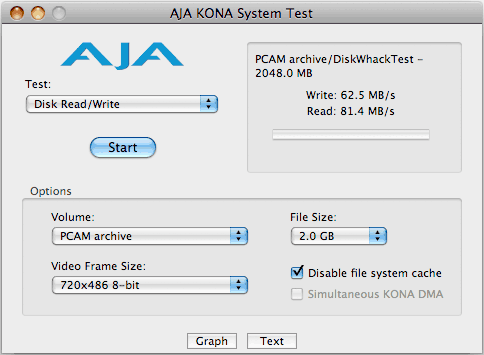
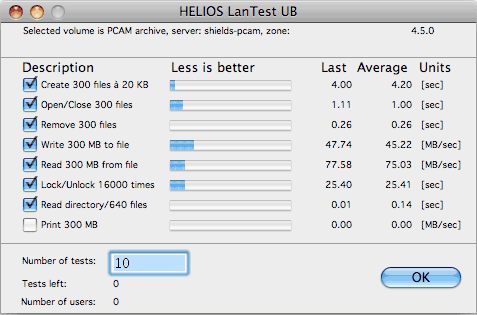
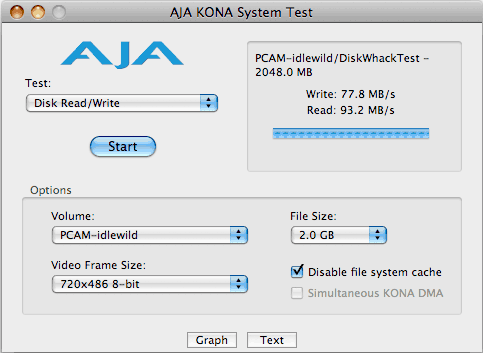
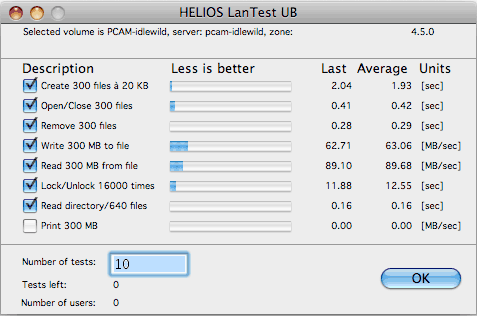
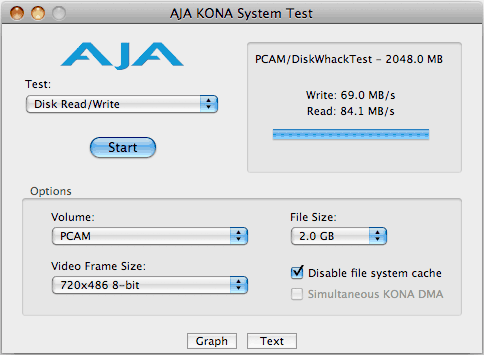
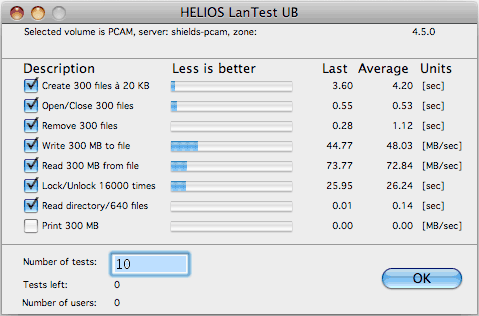
I included both Helios (LanTest, available here) and AJA System Test benchmarks (available here).
I have been impressed with the performance of the QNAP system, especially in speed/capacity per $ - and this is with 8 Western Digital "Green" 2 TB drives - not even the fastest ones around. Let me know if you want any more info or tests.
-Sandor
Promise Vtrac E-Class 10TB RAID5 Kona Tests:
Promise Vtrac E-Class 10TB RAID5 LanTest:
QNAP TS-809 Pro 13TB RAID5 Kona Tests:
QNAP TS-809 Pro 13TB RAID5 LanTest:
XServe 6TB RAID5 Kona Tests:
XServe 6TB RAID5 LanTest:
ReadyNAS Duo (long-term use report):
(added 2/10/2010)
"Hi Mike, I thought I'd give a long-term report on my ReadyNAS Duo. I've used it for about 18 months, and in general, it's worked OK. Originally shipped a single, 750 GB drive (Seagate) with 256 MB memory. I immediately installed a second drive (Samsung F-1). After about a year, it was 75% full, so I swapped out the disks for 1.5TB Seagates (ST31500341AS). Upgrading was easy - swap in one drive, wait a day (disk synchronization), swap in another, wait another day, and then reboot.
One of the reasons I purchased a ReadyNAS Duo was the use of a generally available file system: ext3. This means that if something should happen to the controller hardware and the NAS is no longer supported, I can use something else to read the drive. I can take out one of the drives and connect it to my Mac, reading it using MacFUSE. I believe that for now, the maximum drive that can be used in a ReadyNAS Duo is 2TB.
There were several smaller issues with the box. The web admin interface was pretty slow, often taking several seconds to respond. At least twice I heard long periods of drive activity when none was expected, and after reviewing the logs I suspect that no real memory was available, so the NAS was struggling with virtual memory. Each time a restart brought things back to normal. (I used only the AFP and CIFS protocols.)
One of the drive activity lights got dim (compared to the other one). And the drive carrier mechanism for both drives no longer work very well - it takes a lot of effort and fiddling to get either drive to release.
A firmware update from Netgear enabled Time Machine, and it works as expected. Before using TM, I upgraded the memory to 1GB about six months ago, and the admin interface got much snappier.
Note that Netgear says this system has a SATA-1 (1.5Gbps) interface to the drives. With 1Gbps Ethernet port, probably wouldn't make any difference if it were SATA-2.
The ReadyNAS is used as a Time Machine for my MacPro, plus a network repository for media. Performance via AFP is as follows (it sits on the other side of two Netgear GB switches):
Read: 1GB file - 0:20; 205MB folder with 1,850 files from 50K - 50MB: 0:22
Write: 1GB file - 0:57; 205 MB folder - 0:55
One area where the ReadyNAS (and for that matter all the hardware in my office) has exceeded expectations is ability to work in warm operating environments. I work in a converted, un-a/c'd garage. In general the climate is quite mild here. But, several times a year it gets over 90F. It's never missed a beat.
In summary, the unit provides RAID-1 backup and serves files while allowing me to sleep my MacPro. While it has worked out so far, I will evaluate other solutions when it comes time to replace it.
Best, Kevin"
Synology DS409+ NAS (8TB - 4x2TB)
(Added 2/3/2010 - updated w/more notes)
"As I love your site and the huge collection of information, I'd like to contribute just a little bit.
I purchased a Synology DS409+ from Mindfactory.de (in Germany) and equipped it with 4x Western Digital 2TB WD20EADS. Purpose is two-fold: (1) serve as a TimeMachine drive, and (2) synchronized storage of MP3 and MP4 files.
- The 409+ is connected via gigabit ethernet to my D-Link DIR 655.
- My Macs (Mac Pro 2006, iMac 2009, MacMini 2008) connects via AFP and I achieve R/W speeds of 40/30MB/s.
- To compare: file transfers between the iMac and MacPro run at 80MB/s.
- I successfully use TimeMachine on 10.6.2 on my Macs
- The DS409+ supports quota settings (via userids) to avoid filling up with TimeMachine
- TimeMachine connects automatically to the DS409+ and backs up as it should.
- For the synchronisation I use BackupList+ which is based on the updated rsync 3.06
- BackupList+ is several times faster than DejaVu which I originally intended to use
To summarize: the DS409+ behaves well in a all-Mac environment ... and I am a happy customer.
Greetings, Yves
Belgium"
ReadyNAS Duo: (updated - see below for another ReadyNAS owner's reply/suggestions and Kevin's later reply (long) after that. My guess is that this reader got a bad sample.)
Here's the latest from Kevin:
(added 8/11/2008)
Just a status report. I spoke with a 2nd level tech early last week. He said it could be either the drive or the chassis. He could send me one or the other (not both), and if that doesn't work, would send the other. A replacement drive is on its way (it had 500 sector replacements and 1536 Serial ATA errors ...).
The flashing LEDs do mean something. I found the page, and one set said "no disk drive" (the forum moderator said to take the drive out and see what happens) and the other meant "corrupted root".
-Kevin"
Kevin's earlier report follows:
(added 7/30/2008 - updated w/later comments)
"Here's my experience (so far) with the Netgear ReadyNAS Duo in my mostly-Mac network. I purchased a ReadyNAS Duo 1x750 from Buy.com. Came with a Seagate 750, and I put Samsung F-1 750GB in for Raid 1 capabilities. (FYI - another reader (Eric) sent a note that the 750GB F1 isn't in the ReadyNAS drive compatibility list, although the 1TB F1 is. Eric said he's used 1TB F1's OK in his ReadNAS NV with the benefit of cooler running than the Seagates. Eric also said his ReadyNAS NV has been rock solid for years.) It has been flaky from the start, with the network interface going up and down. These things happen. But here's my main issues:
- Netgear Support: So far, can't get them to return my call.
- Time Machine support is probably best described as a hack: See www.readynas.com/?p=253 ("Making Time Machine work with the ReadyNAS")
Don't get me wrong, I want to like this. Small, quiet, very capable, at least on paper.
(Do you see the same problems with the drives in JBOD (non-RAID) mode? (if it's the network interface/bridge dropping out that won't matter, but just curious). Also asked for info on network/mac configuration just for the record.-Mike)
The unit has gone from marginal to essentially unoperable. I have spent many (frustrating) hours on the phone with Netgear TS, who have led me through hard resets, etc. Now, the NAS just blinks all five LEDs, and is otherwise offline. So far I'd had about a dozen calls, all of them starting with "How can I provide you *excellent* support on your Netgear product?" and all ending "Can you call back?" Lately, they've been asking me to call between the hours of 10pm to 6 am PDT, as apparently that's when the level 2's work. This, as near as I can tell, is an attempt to make me cranky -- now I get the same great service, but get to stay up later -- just kidding...)
I doubt it's an issue with my network -- I swapped ether cables with my Power Mac (main system) and no difference (Mac works great, ReadyNAS Duo still offline)
I removed the Samsung F1 a couple of days ago, putting the Duo back into a "factory" configuration (it comes with one drive, a Seagate). The device can bee seen on the network (that is, the IP address can be seen in the gateway-router's "attached devices" view), but not accessible. When I was last able to use their admin app (FrontView) the Seagate had ~160 Serial ATA errors (I think this was it -- a SMART error, but without checking the error codes can't say for sure).
The net:
- 2 iMacs (2.2 GHz C2D, 3GB, 10.5.4)
- MBP (2.2 GHz C2D, 4GB, 10.5.4)
- PB G4 (1.5 GHz, 1.5 GB, 10.5.4)
- PMac Dual Core G5 (2 GHz, 4 GB, 10.4.11)
- HP PC (2.5 GHz P4, 1 GB, XP Pro SP2)
- 4 network-attached printers/AIOs (all HP)
- Tivo, Roku
- NTGR wireless router, Netgear wired router, various D-Link/Linksys switches
In the end, this isn't about the device. Devices fail, either at the outset or farther down the road. This is about unacceptably bad TS. Let me know if you have any questions.
(and another later mail)
- A couple of comments from the L2s indicate they are happy to help, but only between 10pm and 6am local time
- Many times, the voice connection was terrible, indicating a low-cost link. It was dropped on two occasions.
- The L1 techs would typically ask a question, and then put me on hold for 5-10 minutes, then repeat.
- The couple of times I was forward to an L2, I was on hold for about 20 minutes, then the call was dropped at their end.
- Numerous times they have said they will call back, but did not. The two times they did call back were at 6:20 pm and 11:20 pm (this was on the fourth day).
Prior to this, I can't remember the last time I called tech support (except to activate CableCards on my Tivo). I generally figure it out. But a dead unit is a different matter. Too bad, I used to be a big fan of NTGR, and the Infrant ReadyNAS gets such great reviews.
-Kevin"
Update: Although Kevin said he'd tried a cable swap, Eric suggested he test again with just the ReadyNAS connected to one Mac (simplify the config - troubleshooting rule#1) and not using TimeMachine/hack:
"Kevin's post on the ReadyNAS Duo was a little unfair. He has two main issues, Time Machine support and Netgear's Tech support. Time Machine support? Apple doesn't even support it on anything other than network connected Macs, Time Capsule, or an attached disk (USB/Firewire/Internal). So, yeah, it is a hack. (I assumed from some of the comments he had more than just TimeMachine problems (which he admitted in the comments/link to their page on that was a "hack"), but I don't know for sure. (Update - see his latest reply below.) He may just have a bad sample. And to be fair, Phone calls for Support are usually the first reaction from customers that have problems with a product - if their Forum is a better option their phone (or email) support personell should mention that.-Mike) Have Kevin point to a device that is supported by Time Machine. A little unfair to be complaining about it when Apple doesn't support it.
I have been a ReadNAS NV owner for over 3 years now. The thing has been rock solid, and their tech support forum is great. I suggest he goes to the Forums, and start a topic about his problems, or search out one of the online tech people there. They are great.
And Kevin did not really do a good test of his network cable. Nor did he say exactly how the NAS was configured, which is sort of important with a device that as highly configurable as the ReadyNAS stuff. I suggest again that Kevin hook up with one of the online tech people at Infrant/Netgear, and have them trouble shoot when the NAS is direct connected (ie: one cable connecting a Mac to the NAS). I had them do this and we figured out it was a shoddy cable (which worked fine it seemed until I put the NAS on the network).
(he later wrote)
And one more thing. The Samsung drive (F1 750GB) isn't listed on their compatibility list. (Although the Samsung 1TB F1 is.) Though I have been replacing Seagate 250GB drives in my NV with 1TB Samsung drives (the one listed in this list) and it works great... and 20 degrees cooler than the seagate drives
-Eric"
I wrote Kevin to ask about the above. I'm not sure what troubleshooting steps their TS (phone) suggested, but simplifying the equation is generally the first place to start. It could be he just got a bad NAS sample (it happens) - hopefully we'll hear back with some conclusion/culprit.
(Update - Kevin later replied:)
"Hi Mike, Thanks for the note on this. I probably did not do my homework as thoroughly on Time Machine as I should. Somewhere I must have jumped to the conclusion that Time Machine would work with this.
I'm not sure he (Eric) read the rest of the post very carefully. I have no doubt that the vast majority of ReadyNAS owners are very happy. I know a few myself. But I believe that the unit I have was defective. I have tried to work with Netgear support, all of which have ended with their insisting they will call me back -- which has never happened.
When I first had troubles with the unit, I did post a question to the forum. (That post is no longer there. They had a db crash in mid-July.) A helpful reader suggested that I swap cables. I was pretty sure that this was not the problem. The cable had connected previously to my MBP, which had worked flawlessly -- the laptop now must connect through my Netgear wireless router. In addition, I swapped cables *at the client end* with the PowerMac which I use for hours every day. This would have tested the cable, and the switch port.
However, it's seemingly far beyond a network problem. After about 5 minutes of operation all 5 front panel lights blink. (does that match a diagnostics/status error code?)
I am not sure what it means to discuss the ReadyNAS Duo configuration. Unlike the ReadyNAS NV, which is highly configurable with its 4 drive bays, the Duo is essentially a single drive or Raid 1 box (with a second drive). JBOD is not an option, nor is any other form of RAID (X-Raid is the default). I did turn on some of the services offered by the device: AFP, etc. The FrontView management application is pretty intuitive.
I have been working with computers and networks for some time, long enough to know that I could easily be making a stupid mistake. While difficult to reach, Netgear phone support did take me through a series of steps to see it the device could be repaired or brought back to life. In the last session, they said that the device seems to be defective. Please call back at later tonight. When I did, I was told to call back later that night.
My first choice would have been to use Netgear email technical support. Following the link from netgear.com ("Customer Service," then "Contact Support" there does not appear to be any way to reach support through email. There is a link: Contact Support by Email, which directs you to the login page. Once logged in, there is no method of contacting Technical Support by email. If the poster can point me to a place on the Netgear site where I could send an email (and I mean the place where the email form comes up), it would be appreciated.
The warranty for this seems to be somewhat misleading. The box clearly states 3 years, as does the data sheet. Other places on the web site suggest that phone support (is there any other offered by Netgear) is limited to 90 days, *and* the disk drives are covered by a manufacturer's warranty. The Hardware FAQ points to each of the major manufacturer's disk analysis tools as a way to diagnose disk drive problems.
I think the trouble with my box is in one or two areas. It's not really booting up. The helpful moderator at the forum has suggested that I try a Boot recovery using a USB flash drive, though this involves using the "dd" command from a terminal, and having the "right" kind of USB drive (who knew...?) If you're interested in the gory details:
www.readynas.com/forum/faq.php#How_can_I_perform_a_Boot_Recovery_using_a_USB_flash_device%3F ("How can I perform a Boot Recovery using a USB flash device?")
Second, the last time I had access to the SMART reporting for the included Seagate drive (ST375033DAS), it reported an ATA error count of 1,568 in 228 power on hours. Good? Bad? Will it affect the overall outcome? Who knows...
Does it seem like I have it "out" for Netgear ReadyNAS. It should not. I am certainly not casting aspersions on anyone who has purchased a Netgear product. I own three other Netgear products, and they perform well. I have recommended them to my friends and clients, and they all seem satisfied. But if my experience is any indication, if you are the 1 in 100 who gets a defective product (and you cannot return it to the retailer), the fun is just beginning.
It's worth noting that I dealt with many Netgear TS people over the phone. They were all polite, and seemed like they wanted to help. But it was clear that internal policies prevented them from doing so. I don't believe this was a one-time situation gone bad.
Besides, now I have to start my search for a backup product all over again. I really want to use this.
-Kevin"
If you ever do get a replacement (or solution) let us know.
I've been pretty happy with using FW (FW800 currently) drives for backup (including TimeMachine backups). For my current/primary workstation for the last 8 months I've been using a Ministack v3 with (multiple partitioned) 1TB drive (using FW800 connection, and the Ministack's built-in FW and USB powered hubs really have been useful too). From the comments here on typical NAS drive performance, I don't regret that choice personally.
Synology Disk Station DS508 NAS
(added 7/21/2008)
"
I have bought a Synology DS508 NAS a few weeks ago. I'm very satisfied with it. Beside its rather high price (which I expect to drop in the new few months), it's a almost perfect small server replacement for Mac users. Synology had some small problems with the initial software relaese for this NAS, but with the actual release I've had no problems.
I use five Samsung HD753LJ (F1) 750GB disks with it as a RAID5 volume. AFS works very well and I had very good throughput (about 75MB/s read and 45MB/s write performance, all tested with MTU 9000 Jumbo frames over a Jumbo frame capable HP Procurve Switch; I did the tests with Helios Lantest). Synology claims some Samsung drives have hibernation issues with some of its NAS, but I use only Samsung disks in my two Synology NAS. I also have an older DS107+ with a single HD321KJ) and both have no hibernation issues. The DS107+ works also very good, but it's much slower and since the 2.0.x software release they have some minor AFP issues (you need to restart the NAS sometimes to get AFS running correctly again), but I expect them to correct this in a new software release (with 1.x.x sofware releases, it worked very good).
I also have an APC SUA750I (Smart-UPS 750) UPS connected to the DS508. I'm very pleased with the energy consumption of the DS508 (I guess it's actually a little bit below what they say on the tech-specs). The DS107+ is connected to a smaller APC UPS, also with no problems.
Unlike the DS107+, which is to slow for more than a 2-3 of users, the DS508 seems fast enough to replace a real file server for small workgroups. It's much more energy efficient than a Xserve and it does cost only a fraction of it. Of course, it has not the power of a Xserve, but it's also easier to set up and you don't pay for new software releases.
Together with the energy efficient Macs I use (Mac mini's, MacBook, MacBook Pro), I have found a perfect server for my limited budget as a "real" server cost much more.
Best regards, Christian V."
Buffalo Technology's Linkstation Pro HS-DH500GL NAS: (Updated 4/2/2008)
(added 3/24/2008 - updated 4/2/2008)
"I wanted to provide some user feedback on Buffalo Technology's Linkstation Pro HS-DH500GL NAS. I've been working with one of these Gigabit (claimed performance) NAS devices since December with very mixed results. Initial impressions - slow in actual backup operation, cranky and not Mac friendly. The Linkstation is attached to a Quicksilver G4 Mac with upgraded dual 1.8Ghz 7447 processors (Giga Design) and 1.5GB of RAM. It has two internal hard drives - a 120GB factory drive and a 250GB additional drive connected to a UltraATA 133 card.
My first unit failed after 2 1/2 months of use and the new one has been running for two days. I was able to connect to unit #1 via SMB and using some tricks found both on the xlr8yourmac web page and others. The drive can be accessed through NASNavigator (software included with the drive) and it can be mounted on the desktop. I was able to connect to it via multiple computers. I made it my backup drive for Time Machine and it backed up approximately 253GB in a little over two days. Ultimately though, it failed to connect to my Mac or to a windows machine and resets failed. I lost all my backups but at least the primary drives remain untouched.
HELIOS LanTest results are included above and I don't know how favorable they appear but in real use as a NAS device for backup, this drive is a dog. When using it with Time Machine, the windows and ability to scroll through the past was so slow as to be virtually unusable; it was a very frustrating experience. It's connected to my Mac via a Gigabit switch and all connections indicate Gigabit speeds, however, the reality is my new backup is proceeding at about 400MB per hour (for 24 hours so far) and this time I'm using the software included with the drive, Memeo's LifeAgent. Compared to connection speeds for a USB 2 or Firewire drive, the Buffalo NAS runs at a snail's pace. If your primary interest is an NAS as a backup device, I'd look for another alternative.
The Linkstation Pro does claim a lot of unique functionality, including the ability to configure it to allow remote connections through the network or internet, however, my experience with the system tells me that it would be so slow in this mode as to render it unsuitable for anything other than the smallest of transfer tasks.
(He later sent an update noting another failure)
Just a follow-up for your readers. The Buffalo Linkstation that I reported on March 24th, being a replacement unit for one that died in two months, has itself died in little over a week. When Buffalo replaces a defective unit, they ship a refurbished system. Apparently the refurbished unit that they sent me was still defective as it went into a hard failure 9 days after installation. Once again my backup system is gone. While this is frustrating, the fact that Buffalo products are apparently so unreliable and the fact that the buyer has to burden the cost of shipping their defective equipment is untenable. My recommendation - look at other products and avoid these folks!
-Steve K."
More Feedback on Synology DS-107: (use browser Find to jump to previous reports here on the Synology DS-107 and other Synology models)
(added 3/25/2008)
"I have a Synology DS-107. It works fine, however one big issue I have with it's that ACC (AAC) encoded music does not show ID-3 tag info in iTunes. All the music has empty artist, album, and song names, so you cannot browse it in iTunes. MP3 encoded music shows up fine. This has been heavily reported to Synology for the past year and they have not fixed the issue yet.
Best regards, Pedro"
Auto-Mount NAS Volume at Startup:
"
(in reply to a question in a previous report from a Freecom Network Drive user)
Here is how to do it.
First, manually mount the Drive using the Address supplied by the IP configurator (or whatever utility your NAS uses) using "Connect to Server" under the Go tab of the finder. Once it is mounted, Open Accounts in the System Preferences and "add" (click "+") the mounted drive to the startup items. There is no need to use the La Cie utility every time you want to access the drive. As a side note, and of interest is that in Leopard, 10.5 inherently sees the NAS Lacie drive, and will list it in the Finder Sidebar as connected servers (AFP, smb, etc) --- But -- it will not let you "see" or "access" the drives until you manually mount them. Hopefully, La Cie will eventually make them more bonjour friendly, but in the meantime, use the same system as described above to automatically mount the drive under Leopard.
regards, Gerry"
Lacie Ethernet Disk Mini (more notes/tips on FTP, etc. w/Lacie NAS)
(added 1/7/2008)
"Mike, I always turn to your site for certain puzzles, certain advice. Many thanks.
This is about the LaCie NAS drive (320GB). (I wrote to confirm but assume it's this 320GB LaCie Ethernet Disk mini-Mike) I have the drive attached to a Netgear wireless router and am using Leopard on a MacBook.I, too, was bewildered by the http and ftp servers on the drive. I do not understand (emphasis added!) much of this anyway. But here's what I did. First downloaded the latest IP Configurator from LaCie's site. (available for Macs, PCs, Linux at this Lacie download page.-Mike) I used this to log into the drive. The only time you see buttons solely for http and ftp in the web browser's window is when you log in by way of IP Configurator. That is, if you simply save a bookmark in the browser for the drive you don't see this initial window showing the ftp and http buttons for each share and/or directory.
If you push the ftp button you are taken to a familiar ftp hierarchical window. I noted the address given overhead (it looks somewhat unusual), in big letters.
I opened up Interarchy (an older version) and pasted address into the Get Listing window. And it worked!
I can now access the drive and its contents via a traditional ftp program, uploading and downloading (presumably).
As for Time Machine or SuperDuper, with the former there is that hack going about that enables Time Machine to see NAS drives. Tried it, it works; I started to play with that, but got the willies. Here's why. In the help manual to SuperDuper, in discussing NAS drives, they warn you about certain file systems not supporting files over 4 gigs. The implication was that it raises havoc with the drive. So I chickened out.
Will have to call LaCie to find out if the NAS's xfs file system (or whatever it's called) supports files over 4 gigs in size. My guess is that it can't be reformated for HFS+. I didn't see any obvious way and, again, I don't want to destroy the poor thing.
Hope this is of interest. All the best,
-Alarik"
Notes/Tip re: LaCie Ethernet Disk mini (500GB) FTP: (reply to an earlier post/user complaint)
(added 1/4/2008)
"On an entry of 12/19/2007 (below), Mats L complains that the LaCie Ethernet Disk mini (500GB) doesn't work on its FTP.
I have one too, and FTP works but a bit strange (non-standard):
As you can see from the below log, the 'root' directory where you arrive seems empty, but in reality the shares really exist there as subfolders. on my NAS, there are 2 shares, one called 'share' and one called 'v-drive'. A simple cd command brings me in either of these. From one share you can even switch to the other one, by a simple 'cd /share' or 'cd /v-drive' command.
Connected to xxxxxxx.lan.
220 ProFTPD 1.3.0 Server (LaCie Ethernet Disk mini) [10.xx.xx.xx]
Name (xxxxxxxx:root): admin
331 Password required for admin.
Password:
230 User admin logged in.
Remote system type is UNIX.
Using binary mode to transfer files.
ftpv lsv
200 PORT command successful
150 Opening ASCII mode data connection for file list
226 Transfer complete.
ftp> cd share
250 CWD command successfulv
ftp> cd /v-drive
250 CWD command successful
ftp> ls Tem*
200 PORT command successful
150 Opening ASCII mode data connection for file list
drwxr-xr-x 2 root users 6 Apr 3 2007 Temp
226 Transfer complete.
ftp> bye
221 Goodbye.
Regards, Xavier Van Dessel
"
Lacie's tech support also wrote asking for his contact info. (I wrote him with a FYI on the tips and forwarded the Lacie email to him. I don't give out reader's email addresses without prior permission first.) Mats replied with thanks to Xavier for the above notes on FTP:
"Hi Mike, Yes, that makes it work. Thank you very much. I'm astoundished you find the time to keep track of a small matter like this, and care enough to email me.
I'll get in touch with LaCie and tell them there is a workaround.
Best regards, Mats"
Freecom "Network Drive 500GB"
(added 12/31/2007)
"I have just converted to Mac in the last month, having lived through Microsoft from DOS 2.0 - so moderately computer literate but no system admin!
I bought a Freecom 500GB Network drive yesterday (Product page) - supports Ethernet and USB 2.0. it set up very easily with my router allocating it an IP - I was able to do the setup through the router although the instructions suggest that this requires a direct ethernet or USB connection to the PC/Mac. I installed the supplied SW utilities, and started a backup...then I started to find the limitations. If anyone knows how to overcome them, I am all ears....
1. I have not figured out how to how to get Mac OS 10.4.11 to automatically mount the drive at startup. You need to run the supplied utility first - this means that a timed backup will always fail unless you always run the utility first - annoying. I figured out how to use automator to mount the drive (what a great tool) - took me about 5 minutes from cold. This would work if I could figure out how to put the automator script in the startup folder.
(Have you tried adding the drive as a startup/login item? With the drive mounted in the Finder, go to System Prefs/Accts/your login, select login items, then use "+" key to add the mounted drive as a startup item. Then test a restart to confirm it auto-mounts. Gerry's automounter tip above has notes for Lacie IP Configurator users.-Mike)
I have not figured out how to add a startup item, I will try your suggestion, but there does not seem to be any option in their provided utility that would automatically mount the drive. I will let you know if i figure it out.
2. As with other reports in this forum, although I have 300Mb/s network, I see peak transfer speeds of about 25Mbit/sec - I guess this reflects the read write performance of the disk drives. (I don't think so as any modern hard drive literally has better rates than that - it's the network interface/overhead I think. Although some networked drives have better performance most all are far below the drive (or interface) specs (which are typically max per spec, not real-world)-Mike)
3. As a result of item #2, the backup takes "a while". I have left it running several times - it always fails to complete, throwing an error that one of the drives can't be found. I imagine this is the SMB error reported elsewhere, because the network is alive and well.
4. Here's the killer - I have two Macs with 2 user accounts each. The installed SW will ONLY WORK IN ONE ACCOUNT - it says it is damaged when logged in as the other user - attempts to install in that user account fail unless the first installation is deleted.
5. Given that you can't run a backup from multiple accounts, I thought I could backup from my admin account - OH NO YOU CAN'T - the folders of the second user account are not accessible even though I have access to them and can see their contents.
So I could not recommend the Freecom offering yet - I don't think they have finished it yet - if they have then the instructions and help are not up to the job for a semi technical user (I have an electronics degree so I at least know what an IP address is, I think). It would be a great product if it did what I thought it did when I bought it - t looks well engineered.
Regards, Mike"
Hawking Technology Net-Stor (HNAS1)
(added 12/27/2007)
"Hawking Technology Net-Stor Network Storage Center (HNAS1) (product page)
As a relatively cheap SOB, I jumped when I ran into a "great" deal on a Hawking Technology "Net-Stor Network Storage Center (HNAS1) for only $20 after manufacturer's rebate. It uses a standard 3.5" IDE drive and I had a spare 250GB Maxtor lying around so I thought it was a good way to get some use out of it. This drive is designed to be accessed through Windows with via web browser but I found that I could get it to accept my Mac (Quicksilver with Giga Designs 1.8Ghz dual G4 processor upgrade, 1.5Gb RAM). Note that the NAS does not advertise being Mac compatible.
After installing my HD into the enclosure, I had to connect to the NAS via the Windows XP PC on my network in order to reformat the drive and make it usable by the NAS. The format is Linux ext3 which presents lots of problems. All of the baseline tools for setup of the NAS have to be done within a Windows environment.
Once the NAS reached an initial configuration, I accessed it via SMB and mounted it on my desktop. I modified the setup via my Safari browser (Firefox works as well) in order to name it to something useful and to set baseline restrictions. The documentation is very poor/largely inadequate for my purposes but I struggled through and have been able to at least access it. It does not accept keychain passwords and will not auto mount on my Mac's (OS 10.3.9). I'll be converting to Leopard shortly and will report back on how well that works.
Due to the file format, the Net-Stor has a lot of trouble with file names acceptable to the Mac but which don't map exactly to Windows expectations - unique characters will stop it in its knees. Regardless, after multiple fits and starts, I was able to copy about 101GB of info from my Quicksilver drive to the NAS in about 26 hours.
HELIOS LanTest results:
Create 300 files @ 20KB - average 49 sec.
Open/Close 300 files - average 14.86 sec
Remove 300 files - 19.77 sec
Write 30 MB to file - 2.76 MB/sec
Read 30 MB from file - 2.70 MB/sec
Lock/Unlock 16000 times - 0.05 sec
Read directory/640 files - 43.37 sec
Overall impressions - slow, clunky, definitely not Mac friendly. I put it down as a $20 lesson learned. I just hope my rebate shows up soon - I'd hate to think I wasted even more money! Cut too many corners - pay the price.
All the best, Steve"
NASLite (Software)
(added 12/20/2007)
"NASLite from Server Elements (www.serverelements.com)
I noticed one other review/user of NASLite (older report on NASLite+ from Dec. 2006 below), so i had to chime in. I've been using NASLite for over 2 years now, and the current version, 2, is excellent. You can basically use any old PC hardware to create your NAS, so in cases like mine the cost is simply the hard drives you use. v. 2 has three different versions - one runs off a small partition on one of the hard drives, one runs off a USB flash drive, and the other runs off a CD - all provide the exact same NAS abilities, just the boot source changes.I currently have 2.5 TB of storage in an old Dell tower hooked up via gigabit to a DLink DIR 655 "N" router, and have been able to sustain 2 55 MB/s streams of data over gigabit (one stream only went about 60 MB/s, so i think i am definitely reaching the performance limits of the individual hard drives). I think with very fast hard drives or a RAID setup my old P3 Dell could easily saturate a gigabit network. No software RAID support with NASLite, but there is a list of supported hardware RAID cards - and mirroring is built in, so redundancy is available. I use NASLite in a mixed PC and Mac environment, and have no problem with SMB or AFP or FTP, etc etc - Server Elements has produced a very well setup NAS OS, and other than adding drives, i have had no downtime (the NAS is on a UPS). My favorite function (albeit not directly related to NASLite) is having SuperDuper! backup our 2 MacBooks to sparse images on teh NASLite box. This is done wirelessly, overnight, and quite seamlessly. The best part is that one of the MacBooks internal drives has already failed, and this nightly, automated backup to the NAS worked perfectly to restore a new hard drive to the prior state. I love when vigilant backups save the day!
-Sandor F."
Lacie Ethernet Disk Mini w/Gigabit Enet + USB 2.0: (Note: see 1/4/2008 report above for notes/tips on FTP)
(added 12/19/2007)
"I bought a "LaCie Ethernet Disk mini Gigabit Ethernet & Hi-Speed USB 2.0 500GB" (Lacie Product page) for my home network (a few macs, PCs running windows, some linux boxes).Setting it up using the provided software was no problem. I created a some users and a share per user plus one for common usage. The setup reflected the users on my network.
It has a visually pleasing exterior, it's silent, and it boots rather quickly. So far it looked promising. Then I started to find out it's limitations.
The Macs connect using AFP, the rest connect using Samba. It works well for the Macs, but less so for the others. If I try to transfer large files from or to the NAS, the SMB fails, usually after some 900MB has been transfered.
The network speed tops out at something like 25Mbit/s, making that boast on the box about a gigabit ethernet interface sound hollow.
FTP does not work from any of the systems. You can connect and login, but you end up in the DTP root (/), and the folder is empty. Trying to create things, you get 'permission denied'.
(UPDATE: See Jan 4th, 2008 post above for other Lacie user's tips on using FTP-Mike)
The (swedish) support has been less than helpful; the moment I mentioned I have linux boxes connected to the network, the response was that they don't have support for Linux - even though it's printed on the box that it will work with linux 2.4 and later.
Perhaps I could fix the FTP issue myself - if there was a way of logging into the system, but there isn't. I would have expected SSH to be loaded, but it isn't. It can be added, but requires that you hack the NAS. This is a bother.
Can I recommend this NAS to others? No, I can not. It is too limited, the SMB sucks, the transfer speed is way too low, the FTP is broken, and the support from LaCie is below par.
-Mats L."
Mats later replied with a thanks for the FTP tip.
Follow-up from Synology DS-107e user after Router/Base Upgrade:
(added 10/17/2007)
"You published an earlier report of my Synology DS-107e NAS on 8/31/2007. Since then I've been totally happy with this unit. After purchasing a new MacBook Pro with wireless "n" capability I decided to upgrade this system by changing my old D-Link router (DI-624 AirPlus Xtreme G, now discontinued) out for a new Apple Airport 802.11n Base w/Gigabit Ethernet LAN/WAN ports. The improvement was immediately noticeable, I've not run any Benchmarks, but when observing the throughput of a SuperDuper "Disk image Clone" operation, the copy speeds average 4-5 faster then with my older PowerBook and D-Link router. To say I'm pleased with this improvement would be an understatement.
(I asked if he'd applied the Airport 802.11N base 7.2.1 firmware update.-Mike)
Yes I updated the firmware to 7.2.1 as prompted during the installation. I've not witnessed any problems, then again I'm not using the "AirDisk" feature.
-James"
OWC/Ximeta NASPerform
(added 10/15/2007)
"Mac: G4-450 AGP slot Tower upgraded to 1.4GHz, running OS 10.4.10
On 26 Jul 2007 I purchased Quantity: 1 OWCNASP7750GB16 750GB (7200RPM 16MB Cache) OWC NASPerform - Network Attached/USB 2.0 Storage Solution featuring NDAS from Other World Computing. It came with a OWC Manual. I went to the Ximeta site to download their version of the manual.
I purchased it as a remote storage device accessible from multiple Mac's. From the box, I started it on a USB connection and then hooked it into wired Ethernet. Everything worked OK until we recycled the router (turned power off). The NAS icon disappeared from the desk top. Computer reboots would not bring back the icon to desk top. The NAS would only mount on the desk top after I hooked it up to a USB port. Returned to the Ethernet it mounted and worked OK until the router was recycled again and NAS icon again disappeared from desk top. Disk Utility showed the NAS dimmed but would not mount it. NAS utility said it was mounted but no icon showed on the desk top. Dismounting and remounting via NAS utility did not change situation.
I ran Disk Warrior. I wish I had made a screen dump of all the problems it claimed to have corrected. Most of those listed I have never seen mentioned before. Disk Warrior then mounted the NAS on the desk top. Since then the NAS appears to be working OK including surviving some extreme voltage fluctuations on the house line and any number of router recycles.
I have not attempted to access the NAS from another computer this entire time. That it can be used in read only mode from other Mac's is a downer. The overly large activity light, extremely bright, very annoyingly so, rotates through several colors. Regular LED light(s) would be preferable. I spent a lot of time on this item and do not feel I understand it. I am not a happy camper.
-Charles S."
Synology DS-107e NAS Report
(8/31/2007)
"I just this week purchased a Synology DS-107e NAS enclosure for SATA drives. I installed a Seagate 250Gig sata II drive into it, really easy to do, with good documentation. The setup went quickly and it was up and running in less then 30 minutes.It is connected via ethernet cable to my D-link wireless router (DI-624 AirPlus Xtreme G, now discontinued) and all 3 of my Apple computers (G4 powerBook, G4 iBook, and intel Mini) work well with it. I load the user shares a boot time on all computers via afp-Url in user-login-preference. I use both ChronoSync and SuperDuper for backups to this NAS drive, and both software packages can find and mount if needed my user shares and backup to them without a problem. This is my first experience with NAS, I did some research "xlr8yourmac" and other websites, and decided on the Synology. So far I'm very pleased with this unit.
-James
"
On Oct. 17th James sent an update after switching to an Airport 802.11n base w/Gigabit Ethernet.
Synology DS-106 and QNAP TS-201 (updated with more info on model specifics)
(8/31/2007)
"I use both a Synology Disk-Station 106 and a QNAP TS-201 on my network.
(I asked if he had the DS-106j. There's previous reports here on the DS-106j and DS-106e models and if this was the QNAP TS-201 he had.-Mike)
It is actually a DS-106. It was the SMB version of the DS-106e. Which was as far as I can tell a predecessor to the DS-106j. Each model is slightly different in the software. Had three advantages, came in black, was diskless and supported secure FTP support.
(About the QNAP TS-201) The version I am using is from Ripcaster in the Uk. But is a TS-201. Now replaced with the TS-209 (https://www.ripcaster.co.uk/node/133) They change the OS to support Slimserver. My primary reason for wanting it.
The Synology is excellent. I use it as a NAS for both Windows and Macs, A Blog server and as a Wiki server. Works really well in all modes. I have had no problems at all with it. I have found the forums excellent for supporting minor mods to the software (like enabling telnet). I have used it to store data from Windows and access it with OS X, and vice versa. Never failed me yet. I also have a QNAP TS-201 running on the network. While I haven't built up as much experience with it yet, as it is mainly used as a music server, it seems to work very well. It is slower to boot than the Synology. I should note that it has been modified (by the supplier) to run Linux. With this version I can not use the "Connect to Server" drop down menu but have to attach it via the network drive icon. Other than that minor irritation it appears to be fine. In the past I used to have a Lacie Ethernet Disk (the rack mounted one). I very quickly learned to hate it. The window operating system was a real problem. My principle problem was that I never found a way to change the settings that required users to change passwords every so often. Once the software wanted you to change the password I could not log on via a Mac as it made a mess of the windowing. I normally ended up having to connect a monitor and keyboard to it and going in via the direct window interface to sort it out. They may have sorted it out in more recent versions of the software, but I have avoided them ever since.
With the Lacie, the FTP server function also stored things outside the normal shares. As I remember in some really weird place on the disk, that I ended up having to dig out when I went to clear down the machine.
Hope this helps
-John"
250GB LaCie Ethernet Disk Mini:
(8/30/2007)
"250GB LaCie Ethernet Disk Mini (Gigabit Ethernet + USB 2.0):
Just to let you know, after a couple of false starts with other products this LaCie offering has been my NAS solution since late 2005. I have it automount via AFP on both my Macs (G4 Mac Mini, Core Duo Macbook Pro). Initially I wanted to use it both as a video and as a music server.
Connection speeds are too slow to use it for video but it works OK for music (though the connection does drop from time to time). My network
consists of an Airport Extreme (802.11g) base station (to which the drive is connected via ethernet) and two Airport Express blocks.
Though the LaCie drive works well with my Mac setup I cannot recommend it. It went back to LaCie the first time for a firmware update to get
the USB 2.0 connection to work with my Intel Mac (for some reason - I can't remember the details - it was not possible to reflash the drive
over the network or via my PPC Mac Mini). The drive is now about eigtheen months old and it just died on me - it simply won't switch on.
Straightforward hardware failure. The drive itself is OK but the housing failed. As LaCie's warranty is only for a year they will not
repair it. This is not the first time I've heard of quality control problems affecting this brand.
I'm now looking for a reliable Mac-friendly NAS solution from another brand.
Chris K."
Synology DS-106j NAS (There's also some earler reports here on the DS-106e)
(8/24/2007)
"I just bought a Synology DS-106j NAS enclosure from Tiger Direct. Having champagne tastes on a tap-water budget I did my research first. I have a small mixed platform network at home. Macs running OS 9 & OS X (Tiger) as well as laptops running Win-doze 2K & XP. I thought the price was a little high (at first) but after installing the drive and setting it up I consider it a bargain. It works with both OS 9 & X without a problem which was my main concern. Haven't tested it with Win-doze yet but I don't think that there will be a problem. The throughput is a lot better than the BOSS unit I told you about earlier. So far I haven't found anything negative about it but if I do I'll let you know. The DS-106j uses an IDE drive, while the DS-107j uses a SATA drive. Synology's web site has a chart listing the differences and performances of the different models.
Hope this helps others looking for a cross-platform NAS.
-Mike J."
Yellow Machine P400 Firmware Update: (from one of the readers that commented previously on the Yellow Machine.)
(added 4/23/2007)
"
My YM came with firmware version 3.01 There is a .iso version of the final version (3.30) available here:
www.daffysworld.info/files/Yellow_Machine_3-30_Installation_CD.iso.
I was able to upgrade my YM using Virtual PC, But it was a struggle.
I reran Helios LAN test WiFi (802.11G) and didn't really see any big
differences.
Still can't get NFS to work.
-Mike
"
An earlier report from Jeff below noted he enabled NFS via a checkbox in configuration but he had to rename his Macs as some had spaces, etc. in the names.
Yellow Machine P400 1.0TB ("Yellow Machine" P400 1.0TB NAS/Router/FireWall w/RAID 0/1/5 Support - company out of business, so the only support is via a user site/forums at www.yellowmachine.com)
(added 4/19/2007)
"I purchased a yellow machine from OWC and I'm using it on a mixed network with Win XP media center (gaming machine) iMac G5 iSight, iMac G3 (both on 10.4) and QuickSilver G4 (10.3) and a D-Link 713P router.I did my configuration with the Win XP machine following the quickstart guide which says connect the YM to the router, connect the PC to the YM. The YM was not visible in the YM Manager software until I manually set the IP of the XP machine to value suggested by the software. It actually came up and told me it couldn't find a YM so set the IP to something. Then it showed up and I was able to configure it. I have been able to set my IP back to auto and the YM still shows up now. The YM was shipped setup as RAID 5 and I enabled NFS. (In reply to an earlier YM user that mentioned problems running NAS)
I think his issue was the names of his systems. Turning on NFS was just a checkbox in configuration but when I tried to add the Macs as users to the
mount. I had to go and change the Mac names.
He said: "Still trying to get NFS working. Should be faster than Samba. The
YM doesn't like non-Windows log-in names which my Macs have."
To be honest I don't know that I'm using NFS but I assume so because the
drive (called Drive1) gets mounted, not the server name. I did have to change my Mac network names to names with no spaces before I
could add them as users. Then they were able to access it just fine on the network. I have not tried the YM Manager via the web client from a Mac. The only issue I had was on the iMac G5 which is used the most I used Deja Vu (version included with Toast) to back up some large folders and towards the end it had some i/o errors and missed a couple dozen files. I was able to copy them manually without issue so it may have been a network issue. I have it on a UPS but the APC UPSes that I have don't have serial ports. I do have a Belkin and another brand with serial ports that I'm going to try when I get a chance since from reading on the forums it will take 8-10 hours to rebuild if a power outage causes any corruption. Right now I am using it for weekly backups and turning it off when complete.
-Jeff T."
An earlier report follows:
(added 4/19/2007)
"Got my Yellow Machine P400 1.0TB from OWC (Apr. 13th). Spent several hours getting it to work. I could not make it work via the instructions that came on the CD. The big problem is that the default setting on the LAN side of the YM is DHCP client! Don't know how the thing could ever work according to the directions. The 2nd thing to note is that is does take a loooong time to boot. What I finally did was hook one of the LAN ports to my router. It is then available.
Now to log into the YM Manager. I used IM 5.2. (You can use Safari, but turn off the pop-up blocker.) You can then log into the manager at HTTP://(whatever IP is assigned by your router):10000/
I'm still messing around with settings but it does work. A little slow since it is limited to 100baseT but it is nice to have those extra gigabytes available.
So far I am happy. A lot of storage for the price. Documentation is horrible. Got the hint about the YM being in DHCP client mode from comments on www.yellowmachine.com.
I am using it in RAID 5. I had used RAID 5 in my previous life as an engineer with Northrop Grumman. (I am now retired.) I liked the combination of speed and redundancy.
Nothing exciting about my network. Cable modem to wireless router. Router set up as DHCP server. Router also has ethernet ports one of which I connected to the YM. I am using the YM in the NAS mode. Haven't tried it's firewall or router modes. Probably won't.
Since all my machines are Wireless (802.11G) the speeds would be limited by the wireless. May try a direct ethernet connection at some later date. Speeds I have seen reported max out at about 5 MB/s, limited by the 100baseT.
(He later wrote)
Here is a clip of a chart of throughput (RAID5).

(He later sent log files from tests of the RAID 5 volume via wireless (G) and Ethernet using Helios Lantest.-Mike)
Still trying to get NFS working. (Another user above said he enabled NFS-Mike) Should be faster than Samba. The YM doesn't like non-Windows log-in names which my Macs have. Been a long time since I set up Unix and Windows networks.
I'll keep you updated as I fumble along.
FWIW, here's a picture of my setup. Bottom to top, UPS, Yellow Machine, cable modem and router. In the garage. I'm still unpacking - 40 years of my stuff + 60 years of my folks!
-Mike A."
Thecus 5200 and Infrant ReadyNAS 1100 (I've added links to the mfr's sites for these. If you send a report, please include the mfr's web page URL for the product. thanks.)
(4/3/2007 - updated with correct Thecus model no.)
"Hey mike this is actually two reports I've tested two Thecus 5200's (www.thecus.com is mfr's site but it's horribly slow today) a while ago and a infrant Ready NAS 1100 recently. All the NASs were fully populated with seagate 750 GB drives. So that's a lot of storage.
I really liked the thecus over infriant stuff. The thecuses were a little new (at the time I was testing them) but they were well documented (i.e. they said what the second gigabit Ethernet port could be used for and how to use it that way). The thecuses were each setup as a single RAID 5 volume with 256K blocks (this took many hours -14?- to build). They shared fine and fast over AFP and SMB. It was easy to set them up but one of the thecuses didn't exactly take to all the users and groups I wanted to make. I had to compromise and make the sharing setup on both simpler.
The clients were a G4 a PCI-X G5 and a powerbook G4, most running 10.3.9, none having ethernet hardware that supported jumbo frames. Xbench scores looked like this:
Disk Test (overall score) - 51.84
Sequential (overall score) - 34.71
Uncached Write - 15.66, 9.62 MB/sec (4K blocks)
Uncached Write - 70.97, 40.16 MB/sec (256K blocks)
Uncached Read - 35.01, 10.24 MB/sec (4K blocks)
Uncached Read - 114.38, 57.49 MB/sec (256K blocks)
Random (overall score) - 102.39
Uncached Write - 93.56, 9.90 MB/sec (4K blocks)
Uncached Write - 42.74, 13.68 MB/sec (256K blocks)
Uncached Read - 1421.44, 10.07 MB/sec (4K blocks)
Uncached Read - 233.88, 43.40 MB/sec (256K blocks)
A screenshot from Helios Lan Test (available here) is also attached.
(screenshot was done with window deselected)
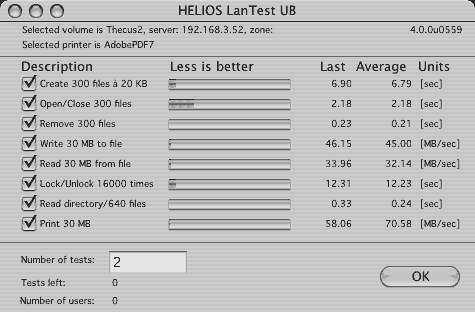
Surprisingly this wasn't good enough for the client. He wanted to do shared video editing to these and eventually these would randomly drop a frame after about 20 minutes. There was some ways scrubbing video fro them wasn't exactly like a fixed disk. The client went through the roof. His vendor suggested to do sharing through SMB it benchmarked like this...
Disk Test (overall score) - 46.42
Sequential (overall score) - 31.85
Uncached Write - 15.65 9.61 MB/sec (4K blocks)
Uncached Write - 53.62 30.34 MB/sec (256K blocks)
Uncached Read - 35.23 10.31 MB/sec (4K blocks)
Uncached Read - 68.36 34.36 MB/sec (256K blocks)
Random (overall score) - 85.53
Uncached Write - 94.12, 9.96 MB/sec (4K blocks)
Uncached Write - 33.35, 10.68 MB/sec (256K blocks)
Uncached Read - 1231.49, 8.73 MB/sec (4K blocks)
Uncached Read - 187.13, 34.72 MB/sec (256K blocks)
It still wasn't perfectly appropriate for standard def DV video editing and after much screaming and yelling at everyone he returned everything.
He called me up a few months later and says he's vendor has something that will work. He also has somewhat lower expectations. He'll capture video locally and then upload it etc. He says he wants me to rewire the setup with cat 6 cable (it had been nice cat5e that never had a problem doing gigabit speeds) I say sure and ask him to let me know what this new thing is called. He never does. He does share an email where the vendor has tested the new solution with a file copy under windows and gotten a "speedy" 20MB/s. I hit the roof, I call the client and let him know that that isn't that speedy.
Anyway I rewire the office with cat6 cable. The computer mix has changed a little there is a PCI-express G5 the old PCI-X G5 and the G4 powerbook. All are now on 10.4.8. The PCI-express G5 has dual-gigabit ethernet that will do jumbo frames, the older G5 gets a small tree card that's dual port and jumbo able and the powerbook stays the same. The office gets rewired and the new thing comes in it's a Infrant Ready Nas 1100. I wire it in and do some of the setup (the vendor has done some). It's firmware is in some ways very mature and dispite that is truely still a UI PITA. It needs a tweak to OSX's TCP/IP setting before it's even usable. Cocktail will do this no ACK delay tweak persistently.
I try to set it up for simple sharing under AFP. I run into many problems besides the speed. I let the client know this thing is brutally slow and can not meet even his lower expectations. He tells me to stop being negative and fix the problems. He thinks my warning to him earlier when the vendor had sent the "speedy" email had been some kind of viewing the glass half empty episode. I spend forever working on a large file size issue. Basically in simple sharing mode guest didn't have enough quota to do larger than 1.95 GB file transfers. I have to go make sharing more complicated in order to give a named user more quota. We don't do the X-RAID setup because the client doesn't want to loose any disk space. The Ready NAS can't really make a volume larger than 2TB on standard raid modes (0,1,5,10) so we wind up making two raid 0 arrays with two 750GB seagate drives each.
When everything is done The ready NAS benchmarks like this...
Disk Test (overall score) - 20.52
Sequential (overall score) - 12.84
Uncached Write - 6.11, 3.75 MB/sec (4K blocks)
Uncached Write - 13.86, 7.84 MB/sec (256K blocks)
Uncached Read - 16.92, 4.95 MB/sec (4K blocks)
Uncached Read - 59.65, 29.98 MB/sec (256K blocks)
Random (overall score) - 51.04
Uncached Write - 38.71, 4.10 MB/sec (4K blocks)
Uncached Write - 23.75, 7.60 MB/sec (256K blocks)
Uncached Read - 855.79, 6.06 MB/sec (4K blocks)
Uncached Read - 107.98, 20.04 MB/sec (256K blocks)
I don't have a helios lan test benchmark on this and I'm not working on it anymore. The client has found tech more positive who's willing to take the vendor's word that "this should work"...
(He later wrote)
I did mean the Thecus 5200 (not 5100, which doesn't exist) and their product page sure is slow today. As far as the benchmarks all the NAS devices I tested scored really high on 4K uncached random read it may be a bug in Xbench or it may be the one thing the NASes do really well. (typical drive scores are under 1MB/sec for that test) I reported that as xbench gave it to me.
Also to be fair to the Ready NAS it was a more mature solution. (some other users here liked the Ready NAS) There are abstractions within it's programming that are extremely useful for doing file sharing. i.e. distinguishing between Volumes, shares and quotas, I just wish you didn't have to manually fill them out in different units (gigabytes megabytes and even K) I wish there was an optional slider. The slightly complicated users and groups setup I mentioned that one of the thecuses couldn't do I don't think would have been a problem for the ReadyNAS. The ReadyNAS even lets you assign UID's to different users. For speed the thecus is clearly the winner but if you have a workgroup where different users need different rights the ReadyNAS is probably a safer bet
-J
"
Lacie Ethernet Disk Mini (Gigabit Ethernet + USB 2.0):
(4/2/2007)
"LaCie Ethernet Disk mini (gigabit Enet + USB 2.0)
I received my backordered LaCie Ethernet Disk mini - gigabit - Friday after waiting 2 months since I pre-ordered it. Although I typically wait for a product to be out for a while before I purchase it, my 7-year old Lacie Pocketdrive has survived despite being typically abused, I took a chance on their new NAS drive. I decided to get this instead of the new airport-n (and then connect USB drives), because the airport is not gigabit, and I am a hard-wired type of person. I am not disappointed.
Having following posts about the difficulties associated with the Buffalo, and other NAS drives, I wanted to get something to centralize my music and file backups without the hassle of fooling with DOS disks.
The Lacie is advertised as supporting Apple HFS, Windows and Linux. It also has a USB port to connect an additional USB drive. I had concerns about how Mac-compatible the 250GB (they also have a 320gb & 500gb) the Lacie internal drive would be because although it can be reformatted, you cannot choose the format type. I thought it might only be a foreign type format that might be fussy about all those special characters that I like to use in naming files.
As such my initial plan was to put all of my music (Apple m4a) on the Lacie drive and connect one of my USB drives to the LaCie for all of those antiquated backup files. My Logic was backwards. The music files transferred OK to the LaCie internal drive, but when I connected an already mostly full USB drive to the mini disk, it did not like all of the special characters that already were on the USB drive. It was all there, but many names were truncated at the point of a special character. Surprisingly though, new files copied onto the attached USB drive, as well as files copied directly on the mini disk did not lose any special characters and the custom icons were even maintained. So I reversed my thinking, and copied my backup files to the Lacie -no problem, and connected my music on a USB drive connected to the Lacie. Sweet.
The software that comes with the mini disk works flawlessly on the Mac. Their "IP Configurator" found (and displayed) the network address that is needed to connect to the drive in a web browser (I used Safari). I did note that although the IP Configurator worked on my older Quicksilver g4, It crashed when I tried to use it on my Intel iMac. Downloading the most recent configurator from Lacie solved that issue quickly.
Being new to NAS drives, it took a while for me to get things just right, and I fooled around with about everything that is available in their browser based tools for configuring the drive. The network address (that the LaCie was given by my airport) quickly connected me to the unit in Safari. The software is highly flexible, allowing renaming of both the LaCie and the USB drive, setting up users with defined access (read/write or read only) and allowed setting up shares on the fly. This would seem useful in that you would not need to partition anything to set up numerous different accessible areas for different users (each with their own permissions.)
With all of my blundering and experimentation, I did manage to break something I could not fix. While remaining the drives, at some point, the Macs did not like looking for something "new" and complained that the previous "alias" was not available, then saying I did not have the proper permissions to delete the alias. I thought deleting the USB share would help, but it put the Lacie in a mode where I could not access any USB drive connected to it. After the usual fiddle time, I gave up and emailed Lacie Support, and went on to other things thinking I could fix my blunder in a couple of days. Am I surprised that my tech request to LaCie was answered within an hour? Yes I am, pleasantly. They instructed me how to restore the mini disk to factory settings, and now knowing how it all worked I quickly turned the Lacie and the attached USB drive into exactly what I wanted.
After connecting my music filled USB drive to the Lacie, I launched iTunes and "pointed it" to the network attached USB drive (as the library) re-did the playlist to reflect the new source, and added the USB drive to the login items of the Accounts System Preference, and started playing music. I did the same thing on my Quicksilver Mac and had both of them playing music at the same time. I never really did like using iTunes Shared Music option, as the other Mac had to be on) and other hassles with that, so this is better. While I had both Macs playing different tunes at the same time, I then started transferring my backup files over the network to the mini disk. I will leave the milliseconds for other technical people, but the rough speed transfer rate of 1gb per 2-minutes is fine with me, and with the many gigabytes being transferred at gigabit speeds, neither Mac playing the ITunes music skipped a beat, literally.
I have yet to connect a windows or Linux machine to the network to see how they work (and/or boot camp or parallels), but I tend to believe LaCie got it all right. It is not often that I am happy enough to spend the time to write all this about a product, but I am today, and hopefully will be well into the future.
-Gerry G."
(added Jan, 9th, 2007)
"I recently purchased a Western Digital 160gb Network Drive. (I assume this was their "NetCenter" network drive-Mike)
And while I liked the interface and software bundle, I found that the 10/100 link
was too slow for what I wanted to do, (Chronosync all my machines).
Whats the point of Gigabit connections if you don't use them! I quickly
sold this unit and instead settled on the Buffalo Linkstation Pro 320GB model with Gigbit Ethernet. This is one sweet little unit. When tied into my
D-Link GigE switch and Cat6 cabling I'm getting transfer rates that blow
away anything I could have imagined. The difference is night and day
over the typical networked devices with 10/100.
With the added USB ports, as a previous poster has mentioned, you can easily expand your
storage, and should you purchase another unit they can back up to each
other over the network. Sweet! I couldn't be happier and have to concur with Charlie (previous Linkstation user report) in every respect. In its price range it definitely
offers more than the others. Happy NAS'ng!
Regards, David"
A reader had asked if anyone had used the ReadyNAS NV+ on their Mac network. Several readers replied.
(added Jan, 9th, 2007)
"I just installed a Ready NAS NV+ at a client's location. Although they are a Win shop, I used my Mac to do the setup and test the installation.Everything worked as advertise by Infrant. The setup was easy (creating CIFS/SMB shares) and the gigabit ethernet interface really flies. I tested the AFP file sharing and it works also quite well; haven't tested with NFS but will since the ReadyNAS is considered as a storage server for some large genomic data sets. The only kind-of-a-rant is the fact that the web interface is hard coded for
at least a 1024x768. If you use a lesser resolution, some of the interface's elements are going to look strange...
Best regards, Sylvain"
(added Jan, 8th, 2007)
"I am taking delivery today of an Infrant Ready NAS NV+ (1TB storage & 1GB RAM) in X-Raid mode. I have a 25 Mac network (and a couple PCs). I will keep a journal on the install, setup, config, and daily use for the next week or so and report to you for your readers. I have been a daily reader of your website for years, keep up the great work!
(He later wrote)
Ok. I got the ReadyNAS NV+ (1TB storage, 1GB RAM) at about noon. Spent a few minutes reading and reviewing the docs. The detailed docs and a Mac application that finds the server on the net are included on the CD. All the setup and management of the NAS is web based. Out of the box the NAS needs your router to be set up to serve IP addresses (DHCP). after initial access you can change the IP to be static in the web management.
The unit I ordered was configured at the factory with four 250GB drives set up in their X-Raid format, so I don't have to spend the 2 to 10 hours formatting, striping and raid syncing of the drives. The unit has a 2 line LCD status display on the front in addition to the LEDs for the drives. It has 3 USB ports (one in front , two on the back) and the Gigabit ethernet port on the back.
The web interface is good, and it has a wizard to walk you through the setup in the correct order. Hard core IT guys can go straight to the advanced menus. I spent about an hour doing the setup (had to setup and configure permissions for 20 people and 6 departments and create 6 shares). I hooked up my APS brand UPS via USB to the back of the NAS and it recognized it in the management software.
When you create the users and add their email addresses, it automatically sends out an email to that user's email with the login and password in the body of the text. It also gives login instructions, but ONLY for SMB and windows users. It does not include the AFP server access instructions for Mac users in the email.
The web control interface is reasonably responsive. I only have 100Mbit switches at the moment, I think that when I get Gigabit switches that it would be more responsive. The file transfers will speed up significantly when that is done (most of my Macs have Gigiabit ethernet).
I am currently migrating 70GB of data from an old G4 Mac tower to the new ReadyNAS, we'll see over the next few days what my users think of it.
-Andrew S.
Vice President Web Development
Interact Communications, Inc.
"
(added Jan, 8th, 2007)
"Today's page asked if anyone has used a ReadyNAS NV+ on their network. I don't have that specific model, but have a ReadyNAS NV (the main difference is that the NV+ has a front panel LCD, which I didn't need since ours sits in the basement unseen, and it also adds Retrospect backup software).
I have been using it for several months without issue on our mixed network (Mac mini, 2 iBooks, 2 Windows PCs, and 2 Xbox systems with Xbox Media Center installed). I have it set up using X-RAID, infrant's own version of RAID 5 which allows you to replace your hard drives with larger drives and once all drives are replaced the RAID sees all the new storage. For example, I have 4x400GB hard drives installed in it now which gives me just over 1TB of usable drive space. If, down the road, I want to migrate to 750GB hard drives, I can do it one at a time and, at first, the system would see it also as a 400GB HD but once I add the last 750GB drive, it would then see all the drive space again.
It supports various file services such as CIFS, AFP and NFS. They have a responsive support team via their online forums and have a Mac OS X section which has proven to be very helpful to me. I use the device to store our media and backups and have not had any issues with it. It may be overkill for some and they are not the cheapest NAS devices on the market, but for me it was what I have been looking for in a NAS device. Thanks for the great website!
-Gilbert
"
(added Jan, 8th, 2007)
"i am using an older ReadyNas...works perfectly, no problems at all, fast, great...use it as itunes server, as ftp server, back-up....also have a FW800 raid, but the next box i get will be the NV+...so much cheaper, way more options and speed is great for most applications.
-Paul
"
(added Jan, 8th, 2007)
"Hi Mike, Saw your item on the front page of the site today asking if anybody has any experience with an Infrant ReadyNAS NV+ on a Mac network. I have an older ReadyNAS X6 on my network, and it works perfectly in a Mac environment. The NV (and the NV+) are basically the same unit in a newer cabinet design, and they use the same firmware, so the NV should behave the same.
The ReadyNAS support AFP out of the box, so you can easily mount it on a Mac, and it understands the Mac file naming and special characters. There are some issues if you mount via SMB, since the SMB protocol only allows a subset of the characters that OS X allows in a file name. This is a problem only if you have an app that creates files with one of these characters, and doesn't handle the renamed version correctly. I believe Aperture has this problem. The solution is to stick to AFP. (Older firmware had some performance issues with AFP so folks were using SMB/CIFS, but the 3.0 version made some nice improvements in AFP speed.)
Finally, there is a pretty active Mac specific forum on Infrant's site, so if you do run into any issues there are a lot of folks who can help you out. I've been completely satisfied with my ReadyNAS.
-Barry
"
(added Jan, 8th, 2007)
"I purchased a 2TB ReadyNAS NV last summer and ended up returning it. The hardware was solid, but there are major software and performance
problems with it that made it less than ideal for Mac users. Their AFS support did not, as of last June, have anywhere near the
performance they get out of SMB (5-12Mb/sec vs. 20-30Mb/sec). To their credit, they readily acknowledged problems and said they were
working on fixes, but ultimately I decided I didn't want to risk ending up with a $2K brick that wasn't fast enough for my needs. If
you can live with SMB, you might be happier, but I'm not willing to live with SMB's filename restrictions. There were also problems
getting GigE working correctly, but I never made it that far. It just hit my less-than-production-quality metric and after that I
needed to get it off my network ASAP.
There were also usability issues with their UI. It didn't look like it was designed so much as hacked on. The overall software
architecture was rather nice (I realize that sound like a contradiction); it was really all UI issues. It was just incredibly
frustrating to configure; you'd remember that there was a knob to do something and then you spend the next five minutes trying to find it
in their browser. And the browser's pretty slow, that was part of the problem too.
And forget about using it as your SlimServer. It's way too slow for that. It took close to eight hours (!) to build my database and it
was dreadfully slow compared to the mini I was thinking it might replace. For comparison, a full database rebuild on my 1GB 1.5Mhz
PPC mini takes 10-20 minutes. So 10-20 minutes versus eight hours, that degree of slow.
Bottom line: their GigE AFP performance is simply not there. I strongly advise anyone considering a ReadyNAS NV/NV+ to check out
Infrant's OS X user forum here: www.infrant.com/forum/viewforum.php?f=28. They deserve credit for airing their dirty laundry in public, but make sure you make an informed decision before you press the "buy" button.
And finally, a word of warning about Eagis.com. I bought the
ReadyNAS from them. They charged me a restocking fee of 10% to
return this box, so buyer beware. I personally won't be buying
anything from Eagis.com again.
-Derrell
"
I've never heard of that vendor before, but many dealers have even higher restocking fees (15% I think is fairly common).
(added Jan, 8th, 2007)
"I don't have the NV+ but I do have a ReadyNAS NV. Infrant has done a great job, fully supporting AFP and even creating a status widget
(www.infrant.com/forum/viewtopic.php?t=4570) for it. I don't have any issues with mine-- it's fast, stable, and has almost every feature I could ever want. Hope this helps,
-Nolen
"
(added Jan, 8th, 2007)
"While i don't have a ReadyNAS at my home to use all of the time, i do have a client who has one for disk-based backups. In regards to the
Mac it works just fine using SMB -- it does have a special config checkbox for "more Mac compatibility" (which is says to use only for
Mac's and will supposedly negatively effect windoze boxes).
ReadyNAS is my NAS of choice
-Pete
"
(added Jan, 8th, 2007)
"I've been using a ReadyNAS NV on my home network for almost a year. My network is mixed Mac and Windows. It works perfectly. I use it for
backup of large files, including my photo images. Accessing it from the browser is straightforward, but the company also provides
software (RAIDar) to detect the device.
Support via the company's forum is prompt.
In addition, there is a large user base on the forum with recommendations for compatible hardware (hard drives, routers, switches, etc). I've been so pleased with the ReadyNAS NV that I recently purchased a second one and equipped it will four 500GB drives.
-William B.
"
(added Jan, 8th, 2007)
"Hi Mike, just want to let you know that I'm also using a NAS, since 3 months now. It's the NSLU2 from Linksys. ARM powered little box, embedded Linux, 266MHz, 2 USB-ports, 100Mbit
network.
The full power of the box can be reached if you install a new firmware, a
complete Linux (uNSLUg, OpenSLUg) on it (I have the root FS on an 1GB
USB stick, a second HD containing my data). Hundreds of packages for it... (almost) everything can be done with
the small NSLU2.
(the uNSLUg FW is free, will partly replace the Linksys firmware and add
new functions.)
I'm very happy with it, just wanted something which give me flexibility, even if you have sometimes a little bit work (usually on
*NIX) ;-)
It serves my local network (three Macs, two PC's, DBOX - digital receiver, used to stream the music to the HI-FI components ) with
filesharing (SMB & NFS), iTunes music server (mt-daapd/Firefly), audio-video server (TwonkyMedia - UPnP), OpenSSH for remote access.
I want to buy a second one to install Apache, MySQL, PHP and an email server.
I'm accessing it now over wireless from all of the computers at home. For the interested people, here is the best web-site around about getting information about the box: www.nslu2-linux.org
(in regards to AFP support)
Well, "out-of-the-box" it doesn't support the NSLU AFP, I didn't check yet about such a package, because I'm using SMB now from Mac.
But I suppose that is something out there, I saw an kernel module named "appletalk".
Best wishes, Yasmin K.
Munich, Germany
"
(added Jan. 5th, 2007)
"I have been looking for a network drive that will work well with my Mac and PC for months. I like the Infrant and Buffalo TerraStation products but I was not that enamored with the price tag that came with those products. Recently, Buy.com had a sale on the SimpleTech SimpleShare 160GB network drives. What interested me was the mention of Mac OSX compatibility (support) in the product. Coupled with a SALE price of less than $100 it was just too much to resist.
Features
Small size, 5.51" x 8.86" x 1.35", and vertical or horizontal placement makes it easy place the drive just about anywhere. It is virtually slient in operation. It comes with a small universal power (100-240 volt) external power supply. The unit is simple to set up using the one page of instructions required to install the hardware. One more page of instructions on how to access the SimpleShare from the Mac and the disk Icon was on my desktop and ready to use. The SimpleShare has a standard 10/100 Mb network interface. There are two USB 2.0 ports that can support additional drives or a printer. You can mirror drives to create a more secure back-up. You can also stripe drives to create a larger single drive. Don't expect the data rate to increase as the 100 Mb Ethernet is the limiting factor. There is a somewhat limited USB print server in the SimpleShare. Note that the SimpleShare reformats a USB drive attached to it... If you have data on the drive it will be lost.
Setup
SimpleShare is simple to use. To connect I used the Go menu in the Finder and entered "smb://Simpleshare" and the Mac found the drive on the network. The drive then works like any standard network drive. I didn't have to set up IP addresses or any other special configuration. If you add a second SimpleShare you need to give then two different names using the web interface.
More Advanced Setup
The set-up utility application runs on a PC or you can use the web-page on the SimpleShare server from the Mac. On the PC the application set up a "mapped drive" to make it easy to access the SimpleShare from Windows XP. The unit came with firmware version 1.0.0 and I downloaded and installed 1.0.7 from the SimpleTech web site. I happened to use the PC but it should work from the Mac. I also reset the password for access to something other than the default. The system was rebooted when the firmware was loaded and again when the password was changed.
After this step I went back to the Mac. Logged in again and put the new password in my keychain. It is like magic. It just works.
Results
I transferred a movie file from the Mac to the drive and viewed it on the PC and then on the Mac. No problem with either one. Data transfers about 7 to 8 MB/sec on my system to an empty drive. SimpleShare is adequate for back-ups and most routine operations. Overall, I am very impressed with the product. For the value it is a great choice for a Mac user who doesn't have a $1,000 to spend on storage. In fact, I was so happy that when the 250 GB version went on sale last month I purchased another one. If you can find one for a good price this is a fine product for a Mac, PC or mixed network.
-Richard B.
"
(added Jan 5th, 2007)
"I've been using a Dlink DNS-323 since early December. I chose the device for two reasons - the first being a good review on smallnetbuilder.com (D-Link DNS-323: A brand-name NAS worth waiting for) and the second being that its running linux. As it is running embedded linux, well, one can add additional
functionality...
Thought i'd mention that several users have setup a DNS 323 support
forum at forum.dsmg600.info/f3-General-Discussion.html.
Worthwhile to take a look as apart from support issues, there's also
a discussion on how to hack the device and/or tweak the linux configuration of the DNS 323 to allow it to have new functionality.
regards, Robert
"
(added Jan. 4th, 2007)
"I purchased the D-Link DNS-323 NAS box for use on my local network. Not having used network storage before, I wasn't quite certain what to expect. The device itself is easy to use. Drives are simply slipped into each bay and gently pushed in to connect to the sockets. This part is as easy at is comes. Construction is solid and the device is well built and designed.
Network configuration is another story. Because the device and accompanying software is designed for Windows machines there is no easy configuration for the Mac. You must use your browser to configure the system but the written instructions do not provide sufficient information to know exactly how to do that.
When connected to the network it can take some time before the device will appear in the Mac's Network browser. It took nearly 30 minutes of fooling around before the network drive icon appeared. At that point clicking on the Connect button for the device brings up a dialog which has an option to mount the web page. Selecting that option places a network drive icon on the Desktop. Opening it reveals two icons one of which opens the configuration web page. From there it's an easy setup. You can configure date and time, format the drives, update firmware, etc. A visit to the D-Link support site will reveal a firmware update for the device. You can download the update file and install the update from the browser configuration page. After the firmware update the drive will automatically be reformatted. The reformat is for the ext2 filesystem. There is no ext3 option at this point. This is just as well given the better stability of ext2. Drive configuration options are Inidvidual Disks, JBOD (Just a Bunch Of Disks,) RAID0 (striped.) and RAID1 ), mirrored.)
Contrary to one review the DNS-323 box does have an external USB port to which additional external drives can be connected.
(comments from the reader that reported on the DNS-323 previously)
"The rear USB port is only used for connecting printers which will be
shared by the Printer Server function of the DNS-323. Plugging in USB
drives or flash drives has no effect. I just tried it thinking it
might be an undocumented feature.
-Gino"
Although the box itself does not support wireless if you connect it to a wired/wireless network you will be able to access it wirelessly.
I installed a Seagate 7200.9 250 GB and a Maxtor Maxline Pro 500 GB drive configured as a JBOD. Because network throughput is so slow there isn't really much advantage to using RAID0. If you put two equal sized drives in the box you may find using RAID1 a better choice because it provides not just additional storage but additional data redundancy. Worst throughput on a 100BT network was 228 MBs/min. Not a speed demon by any means but competitive with a dedicated USB 2.0 drive. (The DNS-323 also has Gigabit Ethernet.)
An important concern, I discovered, is that the Linux filesystem does not recognize many punctuation symbols that are permitted by Mac OS Extended. Characters such as, !@#$%^&*/?|", are not allowed in a file name. Any attempt to copy a file with any of those characters in the filename will fail with a warning error that the file name is either too long or contains illegal characters. This will create some problems with any files or folders you have that contain any of those characters. They will have to renamed.
(comments from the reader that reported on the DNS-323 previously)
"In fairness, this is not the fault of the Linux filesystem (ext2), but
rather because of the SMB protocol. The Linux ext2 filesystem can
handle far more special characters than even HFS (except / and nul).
The SMB protocol does not allow the following special characters:
forward slash (/)
Double-quotes (")
Asterisk (*)
However, he is right in saying that because the Mac allows these characters in filenames, users will run into errors when copying files
named as such.
As such, it is important for the NAS device itself to support AFP if Mac-compatibility is of utmost importance. It would help in future
submissions if users will indicate that, so other users will know of these gotchas.
-Gino"
I sent an email to D-Link technical support inquiring about the filesystem naming problem along with a couple of other technical questions. Their support site promises a reply within not more than 36 hours. It's been a week now without a reply. This doesn't bode well for support. Telephone support is problematic. The parties at the other end do not sound like English is their first language. The call center may be in another country - my guess is India or Pakistan from the accent. Furthermore, the phones or mics being used by the support personnel suffer from bad popping interference making them virtually unintelligible.
The DNS-323 is one of the few NAS boxes that holds two drives. Most hold one or four, and the latter cost at least twice as much. The DNS-323 is definitely not the best choice for a NAS box to use with OS X and Macs, but if you want a two drive box it's just about your only viable choice. If you don't need more than 500-750 GBs of network storage I believe the Synology DS-106e would be a better choice for the money because of its explicit support of Macs and OS X. (See earlier reader report on Synology DS-106e below-Mike)
(he later wrote)
Wouldn't you know that after I emailed you my notes on the D-Link DNS-323 that an hour or two later I finally received a reply from D-
Link. Essentially they thanked me for my inquiry and said they don't provide any support for the Mac. That was it!! Not even a whit of
an effort to answer my questions even though I'm sure there must be one person in their organization that has some Mac experience.
(Unfortunately this is all too common for companies where their main market is PCs/other platforms. Even Pioneer
typically doesn't provide Mac user tech support, although a lot of mac owners have used/bought their DVD burners. (Many years ago they actually released a mac firmware updater for the old DVR-103/A03/104/A04 drives, but the motivation IMHO for that was
possible damage to the drives if using 4x rated media). Most companies I think feel like the cost of having mac support isn't worth it considering the bulk of their sales are to non-Mac users.-Mike)
Unfortunately, D-Link makes (some) network devices that do work well with Macs despite their lack of support. However, I would no longer recommend them to any novice or non-technically inclined Mac user. The inexperienced Mac user may find themselves completely lost trying to get a D-Link product to work with their Mac even though the solution would be simple. One of my questions really had nothing to do with Macs - it was about using a different filesystem to get around some file naming problems. I have sufficient technical skills to work with the DNS-323 although there are some things I'd like to know regarding its use on Macs. I guess those questions will remain unanswered until I happen to trip over them!!
(He later wrote)
In case your interested. Here's a comparison between a Firewire 400 drive and the DNS-323 network drive. The FW400 drive is a Fujitsu 60 GB 5400 RPM notebook drive. The DNS-323 has a Seagate 7200.9 250GB drive and a Maxtor Maxline Pro 500GB drive. They are configured JBOD (Just a Bunch of Disks) and running at Gigabit speed. As you can see the two are reasonably similar. Tests were done with XBench so they are only useful for comparison. I'm not sure how reliable the individual speed tests are.
Mac Pro system, 2GB RAM, 10.4.8, Xbench 1.3. (Not sure which drive (Seagate or Maxtor) was used for NAS scores but considering the ethernet connection bottleneck, it probably doesn't matter)
Disk Tests Overall Score: NAS: 27.26, FW/Notebook HD: 27.43
Sequential Overall Scores: NAS: 17.60, FW/Notebook HD: 33.53
Uncached Write (4K blocks) - NAS: 5.76MB/sec, FW/Notebook HD: 21.48MB/sec
Uncached Write (256K blocks) - NAS: 16.06MB/sec, FW/Notebook HD: 18.19MB/sec
Uncached Read (4K blocks) - NAS: 6.28MB/sec, FW/Notebook HD: 9.01MB/sec
Uncached Read (256K blocks) - NAS: 12.93MB/sec, FW/Notebook HD: 18.52MB/sec
Random Overall Scores: NAS: 60.44, FW/Notebook HD: 23.21
Uncached Write (4K blocks) - NAS: 5.80MB/sec, FW/Notebook HD: 1.02MB/sec
Uncached Write (256K blocks) - NAS: 15.82MB/sec, FW/Notebook HD: 10.94MB/sec
Uncached Read (4K blocks) - NAS: 0.91MB/sec, FW/Notebook HD: 0.33MB/sec
Uncached Read (256K blocks) - NAS: 9.33MB/sec, FW/Notebook HD: 10.36MB/sec
-Steven K.
"
(added Jan. 3rd, 2007)
"I was in the market for a cheap Network Attached Storage (NAS) device when I saw your recent reports on NAS compatibility with Macs. Thanks
for the excellent job you do on compiling these for Mac users!
I got the D-Link DNS-323[1] after spotting it by accident at Fry's
($239.99 retail price). It is a 2-bay SATA network enclosure with a wireless printer server. It doesn't come with any drives so you'd have
to provide your own. I got this over a complete NAS product like the ReadyNAS, TeraStation, and the like as I needed something that:
* Allowed easy installation and replacement of drives (SATA preferably)
* Provides at least RAID 0/1, JBOD and individual drives
* Works with Mac OS X out-of-the-box
* Cheap(er)
* Preferably with USB/Firewire/Wireless connectivity
The D-Link DNS-323 scored 4/5 in my list. While it doesn't come with a USB/Firewire port for faster data transfers, or wireless connectivity
for convenience, it does come with a GigE network port which is a bonus for me when I need to do huge data transfers (e.g. system
backups). The wireless USB printer server and "iTunes Music Server" are nice bonuses, too.
Installing drives in the device is dead simple -- simply slide in 1 or 2 drives into the bay. No messing with jumpers or cables. Then plug
the unit into the power outlet and into a network switch/hub/router. The drives can be removed easily with the easy-access latches at the
rear. The unit itself is no-frills -- just a power button in the front with 3 LED indicators (Drive 1, Drive 2, Power) and in the rear a USB
port for printer sharing, 10/100/1000Mbps port, and the power port.
The device needs to be configured before use and is done over a web-browser. I had issues using Safari (JavaScript-related), but
Firefox/Camino worked fine. The device is configured to grab an IP Address over DHCP, so you'll need some way to find out what IP it was
assigned. The software provided on the CD and D-Link's website is Windows only but isn't really of much use (nothing that can't be done
in other ways).
The web-based wizard guides the user to setting up the drives: Individual drives, JBOD (all disks combined to form one large drive),
RAID 0 (striped for performance), or RAID 1 (mirrored for reliability). With the v1.0 firmware, It also asks you to choose the
filesystem: EXT2 (performance) or EXT3 (reliability) (looks like Linux is being used). After the drives have been formatted, the device
reboots and is ready to be used.
It only provides SMB connectivity to Macs and not AFP, so classic Mac users will need something like Thursby's DAVE to use it. User/Group
permissions are configured through the web browser and not over the Finder. Performance on a 10/100Mbps network is ok -- 6-7MBps on my
eMac and 1-2MBps on my MacBook over Airport. Nowhere near Firewire/USB speeds but good enough for general purpose use. On a direct gigabit
connection I can get much faster speeds (16-19 MBps). A similar product to this one is Netgear/Zetera Storage Central 101
(SC101)[2]. This is much cheaper at about $100.00 retail but uses Parallel-ATA (PATA) instead of SATA, and only offers 10/100Mbps and
not GigE. (see below for other alternatives) The setup is clunkier since you'll need to cable the drives and tuck them in place (not as elegant and easy as D-Link, but that's the price you pay).
Overall, I'm very happy with the D-Link. It gives Mac users some "future-proofing" since it can do GigE and SATA. It makes for a
perfect back-up storage device especially when used with backup software and RAID-1.
I'm currently using it as my backup storage device (2x500GB Maxtor SATA II/300 in RAID-1) .
[1] D-Link DNS-323 Product page
[2] Netgear SC101 Product page
-Gino L.
"
(from Dec. 18, 2006 news page)
"Just wanted to let your reader know about my NAS experience so far.
I was coveting a ReadyNAS NV+ like everyone else: not just for the 4-drive RAID support, but also for their support of AFP 3.1
connections. I don't generally give my files long names with funny characters, but I've always found AFP works much better for
connecting to shares in Mac OS X than SMB does. Unfortunately, almost all SOHO-targeted NAS units on the market only support SMB; the ones
that support AFP typically only support AFP 2.1 (must be using an older version of Netatalk), the ReadyNAS being the only device
supporting AFP 3.1 I could find for a while.Finally, I stumbled upon some good reviews of the Synology DS-106e NAS. The unit is sold as just a bare case -- you have to add your own SATA drive. It does all the usual file sharing via SMB, but also has a number of unusual extras built-in like a web server with MySQL and PHP, network music and photo sharing functionality (can be easily hacked to support iTunes), and even a built-in BitTorrent client. More important to me, Synology offers explicit and active support for setup from and connection to Macintosh clients, and the unit fully supports AFP 3.1 connections.
So I bought the unit and a 250GB SATA drive. Wireless access is as straightforward as you would expect, both from my girlfriend's ThinkPad and my own 12" PowerBook. Read/write speeds to my PowerMac G5 over gigabit ethernet (hub connected to wireless base) are not mind-blowingly fast, but good enough for our purposes: I get about 270MB/minute throughput in Retrospect when backing up the NAS shares to an external drive on my desktop machine (the DS-106e comes with a Windows-only backup application, but I'm still fine with Retrospect). Fan noise from the unit is barely noticeable, and it spins the drive
down after a period of inactivity to save energy. The only downside to the DS-106e is it's somewhat more expensive than competing single-drive NAS units at a little over $200 without a drive. However, if you want solid AFP 3.1 support and plan on using
some of the many extra features that come with the unit, the DS-106e is a very good deal. I'm glad I did my research and found this product, as it fits our needs perfectly.
I'll post a more comprehensive review to the Drive Compatibility Database soon...
(he later wrote)
I should have been more specific and stated that the Synology NAS unit doesn't have native wireless: it is connected to a Gigabit switch, which is in turn connected to a wireless router for WiFi access. I haven't done any hard benchmarks measuring throughput from the PowerBook and the ThinkPad to the NAS, but it doesn't subjectively feel any slower than accessing my desktop machine from my laptop via regular old file sharing.
Given the OP's setup, they ought to be able to attach the NAS to their presumably open Ethernet port on the Airport Express and that should work just fine.
Thanks for the site. I've been a loyal reader since the very beginning.
-Seth R."
More on Ximeta NetDisk NDAS vs standard NAS (From Dec. 15th, 2006 news page) In yesterday's mac owner reports on NAS, one reader using a Ximeta NetDisk (which is their proprietary NDAS design, requiring drivers) mentioned some drive corruption problems. A reader that was interested in their NDAS drives read an EDN article on the drives that mentioned overheating/drive failures with their earlier hardware samples (see NDAS undressed: dissecting a NAS substitute) and wrote the author to ask if later revisions of the hardware addressed that. Here's the author's reply which makes some good points about relying on a 3rd party driver and future support:
(Dec. 15th, 2006)
"
I would recommend you stay away from host computer software-based storage (ie NDAS, or solutions based on Zetera's technology such as Netgear's Storage Central). More hassle than they're worth; a full-blown NAS isn't much more expensive and, in addition to reducing the computer's CPU burden, relies on industry-standard protocols such as SMB. Can you guarantee that Ximeta and Zetera will remain in business? And if not, what happens when the next operating system patch or upgrade breaks driver compatibility?
Get my drift? ;-)
(and in regards to performance of NDAS vs NAS he replied)
Get a NAS with a Gigabit Ethernet interface...
www.google.com/search?q=+site:www.edn.com+Dipert+NAS
Brian Dipert
Senior Technical Editor: Mass Storage, Multimedia (audio, displays, 2-D and3-D graphics, and still and video imaging), PCs and Peripherals
EDN Magazine: www.edn.com
"
The drive database has Mac user reports on some NAS models that had Gigabit Ethernet (from low-cost BuffaloTech Linkstation Pro mentioned recently here to the higher end ReadyNAS 600).
(From Dec. 15th, 2006 news page)
"Mike, I have been using NASLite+ (www.serverelements.com/naslite-plus.php) on an old HP Vectra VE for over a year now. The server is connected to one of the ports on my wireless router, and my iMac G5 and Dell OptiPlex mount the volume wirelessly.
The server is headless, and all management is done via telnet in the Terminal. I use it as a SMB/CIFS file server, but it can also be used as an FTP and HTTP file server (simultaneously, no less). I did have to burn the .iso image for the install CD using Nero on the Dell, as Inever could get Disk Utility or Toast to burn it properly on the Mac.I started off testing the free version, NASLite, which boots from a floppy and only supports one protocol (SMB, FTP, or NFS...you choose when you download it). Gigabit Ethernet is supported on all versions of 1.x, but NASLite+ has been optimized somehow for faster file transfers. I have not done any speed tests, but there was an appreciable difference when I moved to NASLite+. Configuration is relatively simple, all things considered. The 1.x releases are fairly basic, with no RAID support being the biggest drawback. Drive support is BIOS independent, however; the Vectra's BIOS may not support the 300 GB Maxtor hard drive I installed, but since NASLite+ bypasses it, I am able to utilize all of the available space. NASLite+ supports up to four fixed IDE disks, but you do not have the luxury of renaming them. You are stuck with DISK-1, DISK-2, DISK-3, and DISK-4. System requirements are minimal: a 486DX or better processor, a PCI bus, 32 MB RAM, a floppy drive, a CD-ROM drive, an Ethernet adapter, and at least one IDE
hard drive. My system is a 400 MHz Pentium II with 128 MB RAM, a 3Com 10/100 card, and the Maxtor hard drive mentioned earlier.
The new 2.x releases (www.serverelements.com/naslite-2-cdd.php) offer many improved features, including RAID support, and support for multiple interfaces (IDE, SCSI, SATA, USB, FireWire). There is also a version that can boot from a USB flash drive. I may upgrade for the RAID support alone, as the only server backup system I have in place is an old DLT tape drive hooked up to the Dell. I use the bundled Backup utility in Windows 2000 to incrementally back up the entire disk from time to time.
If you have an old PC handy, this is a cheap (or even free) method of putting it to good use.
- D. Lawson"
(from Dec. 14th, 2006 news page - see above for his later, more detailed report.)
"
I have two SimpleTech SimpleShare NAS servers on my network. It is simple to access the drive by going to the "Go" menu and selecting the one of the servers by name, e.g., smb://SimpleShare. The SimpleTech is easy to use and the function is transparent for both OS X and for a PC. Setup and configuration is from a web interface.
The device comes with Retrospect backup software. The smaller drives 160 GB and 250 GB are frequently are on sale for close to $100. These drives are very quiet. The drives are fast enough to smoothly stream a 320 x 240 mpeg4 video over a 54 Mb wireless link. Measurements with Netspeedometer show 1.2 to 1.8MB/sec, which is reasonable for a 54 Mb wireless link.
-Rick B."
(from Dec. 14th, 2006 news page)
"
I have 3 XIMETA NetDrives (NDAS not NAS) set up within my network.
(I assume these are Ximeta NetDisk models. For info on their NDAS (Network Direct Attached Storage) vs NAS, see this page. NOTE - you should also read EDN's "NDAS undressed: dissecting a NAS substitute". -Mike)
I am able to connect wirelessly to each drive and read/write to them as well. You must install software on each computer to use the drives, however. I have found 1 way around this: have a dedicated Mac (with software installed) mount the NetDrives. Then 'share' these drives so no everyone will be able to mount the drives as if it was a local drive. Speed is decent but it depends on the type of network you have (G vs B).
One problem I have had with the XIMETA drives is that the directory gets corrupted to the point of having to reformat the drive. I have not been able to figure out what causes this.
-Shihab
"
(from Dec. 13th, 2006 news page - for Airport Express users)
"The Airport Express ethernet port can be LAN or WAN configured. This enables you to go from wireless to wired, which I first used when my
sister would visit with her (non-airport) iBook, now I use to to connect my ReplayTV to the network. It's one of the options in the AExp admin utility settings
-Michael L.
"
(from Dec. 13th, 2006 news page)
"
The AirPort Express Ethernet port can be used with a LAN. However, the port cannot be used simultaneously as a WAN port and LAN port. Choose one or the other. I use the bridging feature all the time so both my wireless and wired LAN hosts can stream music to the AirPort Express.
-Steve
"
Another reader suggested using an alternative to a dedicated NAS:
(from Dec. 13th, 2006 news page)
"Based on the cost and SMB wierdness that most NAS drives manifest, often, the best choice for an airport NAS is an old machine
repurposed with an internal wireless card and a big drive. Connect the cable/DSL modem to the ethernet port of the mac, configure the
Mac appropriately for your ISP (for example, Cox uses TCP/IP DHCP and Verizon FIOS uses PPPoE) and share internet to the laptops over the
wireless card using the OSX preference pane. No need for the ABS as a router anymore. The OSX firewall can do just about anything you'd
want to do.Instead of using OSX server, sharepoints (hornware.com/sharepoints/) can be used for user folders, and for making non OSX "client" share locations.
Obviously LBA48 (big drive support) is an issue on G4 towers before late Quicksilver models, but a $60 mac specific PCI ATA card can
handle that. (or a $39 Mac PCI SATA card if you're also looking to buy a new/larger drive. Some 250GB SATA drives are selling for under $80 now.-Mike) With sawtooth G4 machines going inexpensively on both craigslist and ebay, and natively supported Broadcom chipsets PCI
802.11g cards available cheaply, repurposing old hardware is often the best bet and can cost about the same as a good NAS case would.
(he later wrote)
Further adding to the post, upon closer reading of the original poster's issue, I realized he was piggybacking his wireless of his neighbor's connection. (using his Airport Express) I broke out some old hardware, and duplicated his situation myself here, using my own wireless. In this case, he'd have to use two wireless PCI cards, one to recieve the neighbor's connection, and an additional one to create the WLAN in his house/apartment.
The same advise applies, but instead of using the wired port for the WAN in, he'd use one of the two wireless cards. Still pretty cheap given the cost of many NAS drive cases.
-Mike"
"
OK not specifically about Wireless NAS, but IMHO you're better off keeping the NAS separate from the wireless... I just purchased this BuffaloTech Linkstation Pro 320GB drive for $210. So far its working very well. I currently have it attached via a GigE hub to my Westel Wireless Router (wired ports are only 10/100), but could use Airport Express also as one user mentioned. I connect to it via both my MacBook Pro and Intel Mac Mini, both of which have wireless 802.11G and GigE.
The cool part of of the BuffaoTech Linkstation drive is the GigE. For normal access where file transfer is relatively small, wireless is great. However for the big transfers (e.g. HD backup via SuperDuper to remote sparse image, copying multi GB Parallels HD images) I wire up directly via the GigE hub and get 10-15 MB/s instead of 2-3MB/s. It turns hours into minutes. Most people wouldn't think of this till they start that long backup and wonder why it's taking forever.
Of course there are plenty of other nice things about these drives....two USB ports to attached extra drives, built in backup jobs to the external USB drives, Mac compatibility (including AppleTalk), and a fast SATA drive. And the price is not much more than similar drives with less features and no GigE.
-Charlie"
Some of the previous drive db reports on NAS earlier in 2006 also mentioned a Gigabit model (Infrant ReadyNAS 600 for instance - see reader report below from July 2006) although the Buffalo model above costs a lot less than the ReadyNAS 600 (w/o drives), but the ReadyNAS has a hardware RAID controller with 4 drive support.
The oldest of the drive db NAS reports (Apr. 2005) was also the most detailed - noting pros/cons, etc. of an older Buffalo HD-H120LAN model (said it worked well but was UFS based (not HFS+) and a sealed unit.)
Infrant ReadyNAS 600:
(from 7/20/2006)
"
Hi, Mike, Based on the comments on your website, I finally purchased an Infrant ReadyNAS 600 1TB (4 x 250GB). All the reviews here and elsewhere on the net suggested these guys have their heads most together in configuring something powerful and simple in the RAID space. I got mine "open-box" for $703 vs. about $830 brand new ($900 elsewhere). Free shipping, and no payments until Feb 07 with their account (Only worth considering because zero interest; but sneaky: if you are late with that Feb payment, they'll charge you retroactive interest at about 20%/annum). They have more of these
open-box units in stock.
My only complaint is that they (newegg) screwed up my first order, shipped the wrong unit (I guess a brand new one), called it back from the shipper w/o telling me, and dropped some confusing RMA notices in my email. I had to talk to a couple of people at New Egg and spend some time to find out what happened. Worst of all, they didn't just turn around and ship me the right unit. I had to re-order!Anyway, the thing comes configured as RAID 5 by default, but you can reconfigure it as RAID 0, 1, 5, or the new "X-RAID", which comes standard on their NV model (a physically smaller but more expensive box). I tested it as RAID 5 for a few minutes (after all, it is open-box so worth testing during the return period), and then did a "factory default" procedure (required to reset the RAID level) and set it to X-RAID.
It is chugging away as I write, reformatting itself. The "Raidar" user interface for setup and factory-default triggering is simple to use and has versions for Mac, Linux, and Win. And the latest OS Radiator 2.0 c1-p6 or later lets you configure as X-RAID during the factory default procedure. Mine shipped with the latest OS, 2.0 c1-p9, but the Raidar was a slightly outdated version. A quick visit to infrant.com remedied that. FYI, RAID 5 uses one volume's space for checksum, so you get one disk's worth of less capacity. So my 1TB (4 x 250GB) actually only has about 700GB formatted capacity. This system protects against a single disk failure, as 3 disks allow you to still access the volume, and replacing the defective disk causes an automatic rebuild of the redundancy. You are "exposed" to danger until you do that, and there is no protection against a two disk failure (highly unlikely in the short time it will take you to replace the bad disk). X-RAID has all the advantages of RAID 5 (BTW, a 2 volume X-RAID setup would just be a mirror, equivalent to RAID 1), and allows for automatic volume expansion, by replacing each physical disk one by one with larger capacity ones, or adding extra disks if you start out with just one or two. The advantage of RAID 5 over X-RAID is more flexible volume management (partitioning, changing space set aside for snapshots, etc.). You can switch among the RAID levels with a "factory default" procedure, but you'd lose all your data, and backing up a TB beforehand is no small task!
RAID 5 or X-RAID with more than two disks has more calculational overhead than a RAID 1 mirror. I haven't seen a software RAID 5 implementation yet, though Softraid is working on it. Hopefully the dedicated Infrant hardware will make the performance acceptable so that the Gigabit ethernet connection is the bottle neck, not the internal read-write speed and processing overhead. Obviously I haven't tested it enough to say yet. I bought this unit because of multiple macs and pcs in the house with pictures, eyetv videos, and music scattered all over (including on external disks I kept buying as I filled up my internal ones), and data tracking and backup getting to be a real hassle. Now I'll just set Retrospect to do an automatic increment on a regular schedule for the desktop dual G or whenever a Macbook or iBook connects, and use Infrant's bundled backup software for the WinXP machines. I'll consolidate all my external firewire and usb drives' data on this 1TB Infrant device. I'll set up Infrant's OS to take regular "snapshots" as well, so reverting to the day before I accidentally delete those vacation photos in both locations will be a snap! I have 35GB reserved for those volume snapshots.
Of note, there is an optimization setting for Mac OS X to access the infrant SMB/CIFS volume faster (but must be turned off if any old WinNT clients are on the network). The built in USB print server is supposed to work with Mac OS X. The dual USB ports also support flash readers and certain wireless LAN adapters. It can also connect to certain UPS boxes for graceful shutdown during power failures. The OS can act as a DHCP client or server, or you can set a static IP. That was on the Gigabit connection. I don't have a compatible USB wireless adapter to try with it. It also has a built in UPNP A/V server for streaming media players (again not tested by me
yet). So far this is a highly recommended unit.
Thanks! - Paul
(Update: Paul later sent notes on some issues he's seen)
As an append to my report I sent you last night that you've already put
on line:
1. The built-in clock is losing about 1 min every 5 min (running slow).
There is a timer-server synch option requiring internet access, currently turned off, but I shouldn't have to depend on that. The file
time stamp is by this clock so this is an important defect. I've emailed Infrant and am waiting for a reply. Hopefully I don't have to return
this "open-box" to Newegg (one would hope they would fix known problems/reasons-for-return before re-selling.). Infrant is located just
down the highway.
(he later wrote)
I just heard back from Infrant. Problem 1 is a bug in the current firmware release and will be fixed in the upcoming release. Also, they claim time becomes more accurate even in this release if one resets it AFTER the full build operation completes.
2. More serious longer term, my copying of the El Gato EyeTV Archive stopped about halfway because it found an El Gato file name that is
illegal under SMB/CIFS. My work-around is to create a 500GB sparse disk image with apple's disk utility (occupies 100MB empty) to mount and
copying all Mac files to that. The Mac that mounts it can share it using AFP.
3. I was able to record and play an EyeTV HDTV file OK over Gigabit ethernet. There was a little stuttering during viewing while recording
(the recorded file itself was fine) because I did it while it was still building the 4th, redundant disk (an hours long process). If I had been a bit more patient, this wouldn't have been a problem. Not as smooth as I hoped it would be (items 1 and 2).
-Paul"
|
